This page walks through Apna Khata one screen at a time, from the home page to the list of khasras in a village. Every screenshot is real and every step is marked. We stop before the screen that shows owners' names, because we never publish them. For what the jamabandi means once you have it, read our Apna Khata guide. This is general information, not legal advice.
On screen, step by step
1 a step to doA another option check thisBlurred: names, numbers and emblems we do not publish
Open Apna Khata and choose Jamabandi nakal
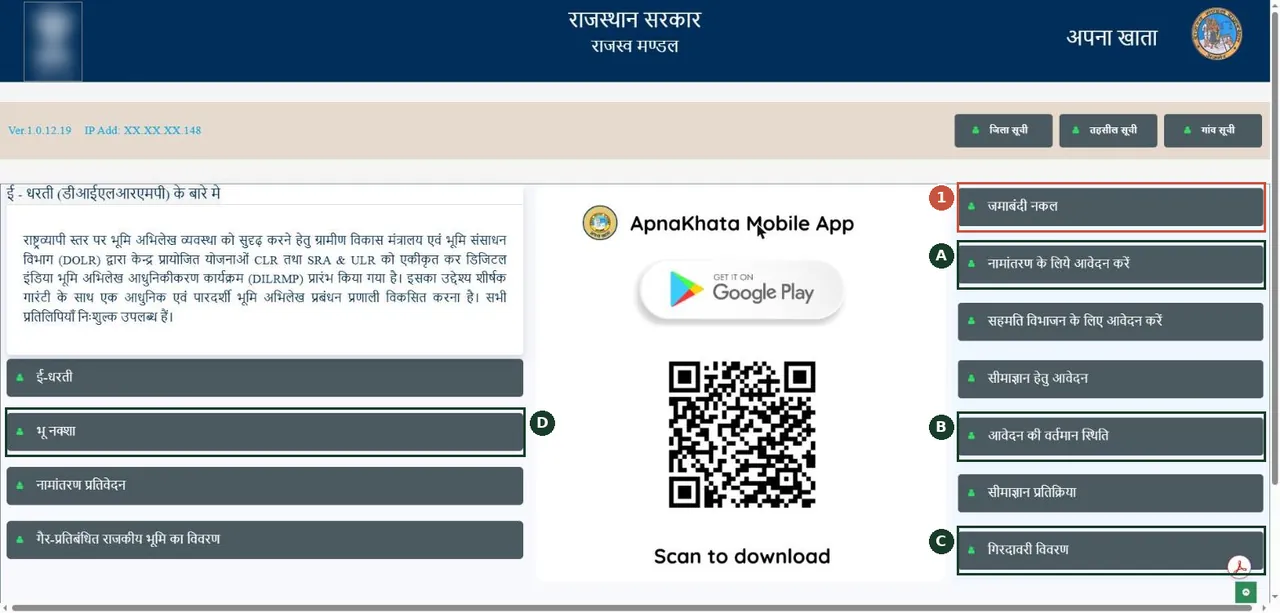
Apna Khata home: the right-hand list holds every service. Tap जमाबंदी नकल (jamabandi copy). अपना खाता का होम पेज। दाईं ओर की सूची में "जमाबंदी नकल" चुनें।Screenshot of the official portal, taken 15 November 2026. AgriZameen is not affiliated with it. Parts are blurred by AgriZameen. - 1Jamabandi nakal
- AApply for mutation
- BApplication status
- CGirdawari
- DBhu-Naksha
Choose the district
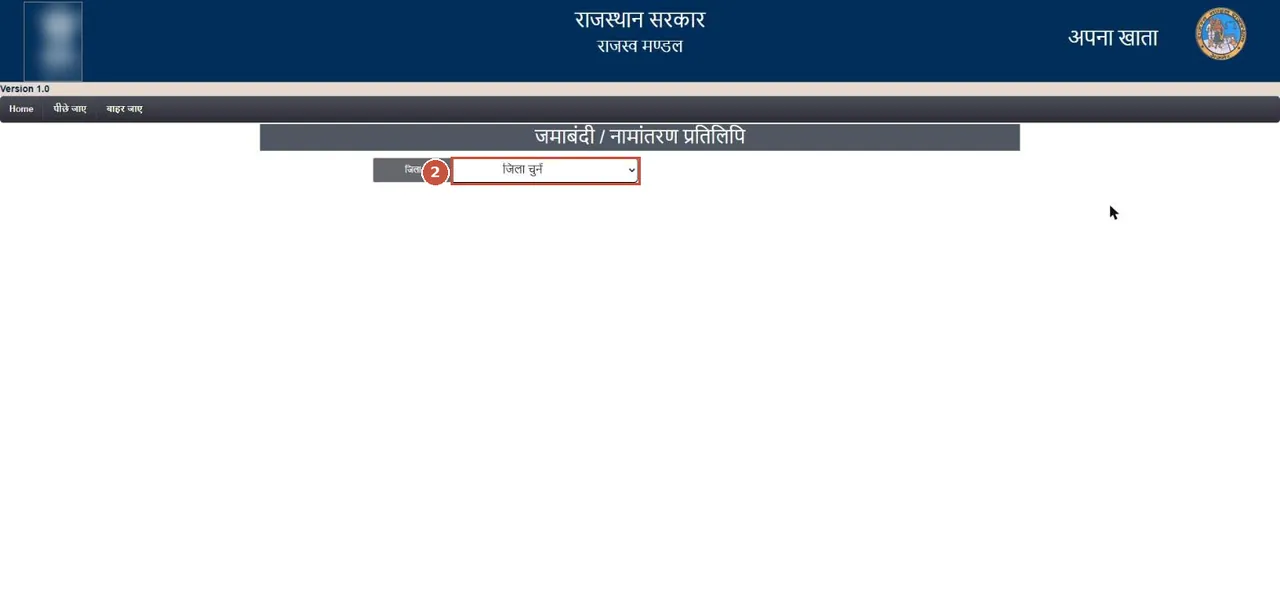
Jamabandi / Namantaran copy: choose the district (जिला) from the list. सूची से अपना ज़िला चुनें।Screenshot of the official portal, taken 15 November 2026. AgriZameen is not affiliated with it. Parts are blurred by AgriZameen. - 2Choose district
Choose the tehsil and the village
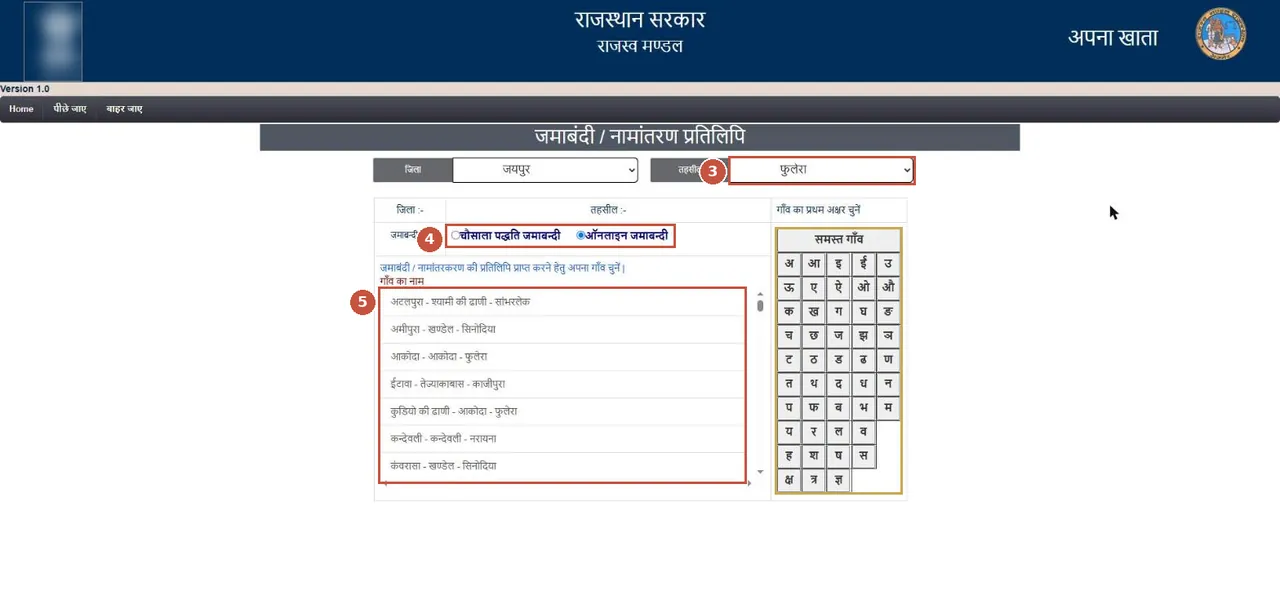
Choose the tehsil, keep ऑनलाइन जमाबन्दी (current record) selected, then tap your village in the list — or tap its first letter on the right to shorten the list. तहसील चुनें, "ऑनलाइन जमाबन्दी" रहने दें, फिर अपने गाँव पर टैप करें।Screenshot of the official portal, taken 15 November 2026. AgriZameen is not affiliated with it. Parts are blurred by AgriZameen. - 3Choose tehsil
- 4Online jamabandi (current)
- 5Tap your village
- First letter
- TipVillage names follow the revenue record and can differ from the spelling you know. Use the first-letter panel to jump through the list.
Check the place, then choose Jamabandi copy

Check the district, tehsil and village at the top, then pick the copy: जमाबंदी की प्रतिलिपि (jamabandi) or नामांतरण की प्रतिलिपि (mutation). ऊपर ज़िला, तहसील और गाँव जाँचें, फिर "जमाबंदी की प्रतिलिपि" चुनें।Screenshot of the official portal, taken 15 November 2026. AgriZameen is not affiliated with it. Parts are blurred by AgriZameen. - Check district · tehsil · village
- 6Jamabandi copy
- Mutation copy
Choose the current copy

Choose वर्तमान नकल (current copy). दिनांक से gives the record as on a past date; गत नकल gives older copies — useful for the title chain. "वर्तमान नकल" चुनें — यह आज का रिकॉर्ड है।Screenshot of the official portal, taken 15 November 2026. AgriZameen is not affiliated with it. Parts are blurred by AgriZameen. - 7Current copy
- From a date / older copy
Choose how to search
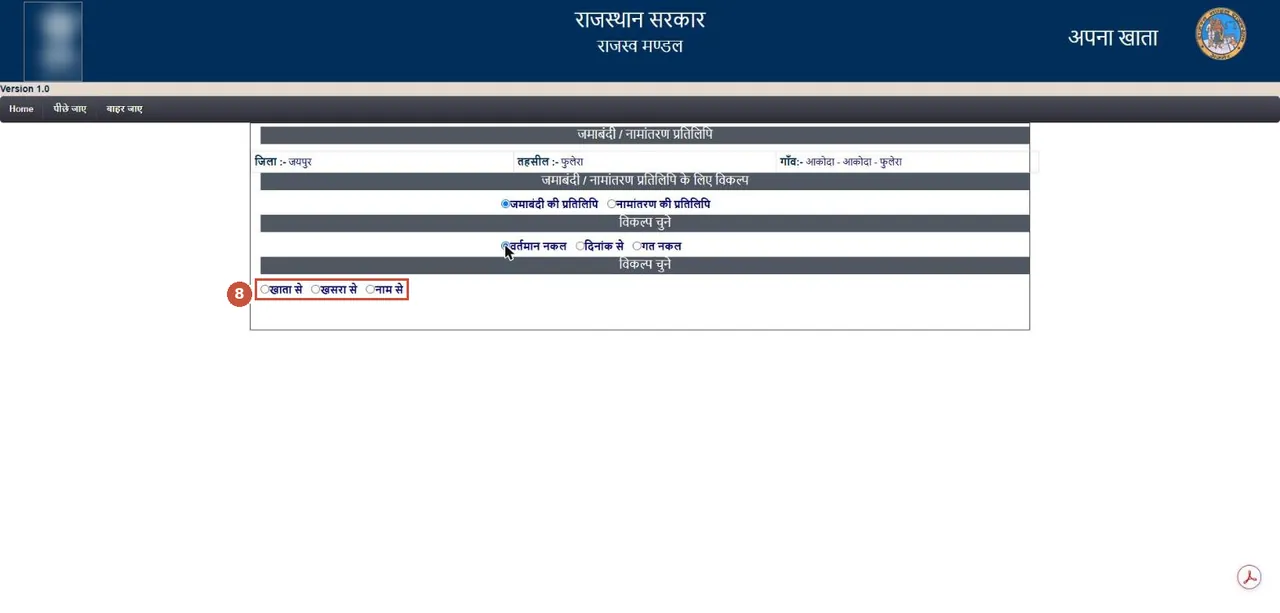
Search the record by खाता से (khata number), खसरा से (khasra number) or नाम से (owner's name). Khasra is the most exact. खाता, खसरा या नाम — किसी एक से खोजें।Screenshot of the official portal, taken 15 November 2026. AgriZameen is not affiliated with it. Parts are blurred by AgriZameen. - 8Khata · Khasra · Name
Pick the khasra

Pick your khasra from the खसरा संख्या list; its khata number fills in by itself. Next the portal shows the record — we stop here because that page carries owners' names. सूची से अपना खसरा चुनें; खाता अपने आप भर जाता है। अगली स्क्रीन पर मालिकों के नाम आते हैं, इसलिए हम यहीं रुकते हैं।Screenshot of the official portal, taken 15 November 2026. AgriZameen is not affiliated with it. Parts are blurred by AgriZameen. - 9Pick khasra
- Khata fills in
- Stop hereThe next screen shows owners’ names and shares. We do not publish it. On your own screen, read every name, the share and the remarks column.
- Why it mattersThe seller’s name, share and any charge on the land come from this record. Match them to the sale papers before any token money.
For the map: open Bhu-Naksha and tap Viewmap

Bhu-Naksha Rajasthan home. Tap Viewmap at the top. (The sample map on the home page is blurred here.) भू-नक्शा राजस्थान: ऊपर "Viewmap" पर टैप करें।Screenshot of the official portal, taken 15 November 2026. AgriZameen is not affiliated with it. Parts are blurred by AgriZameen. - 1Viewmap
Choose the village and sheet, then find the khasra
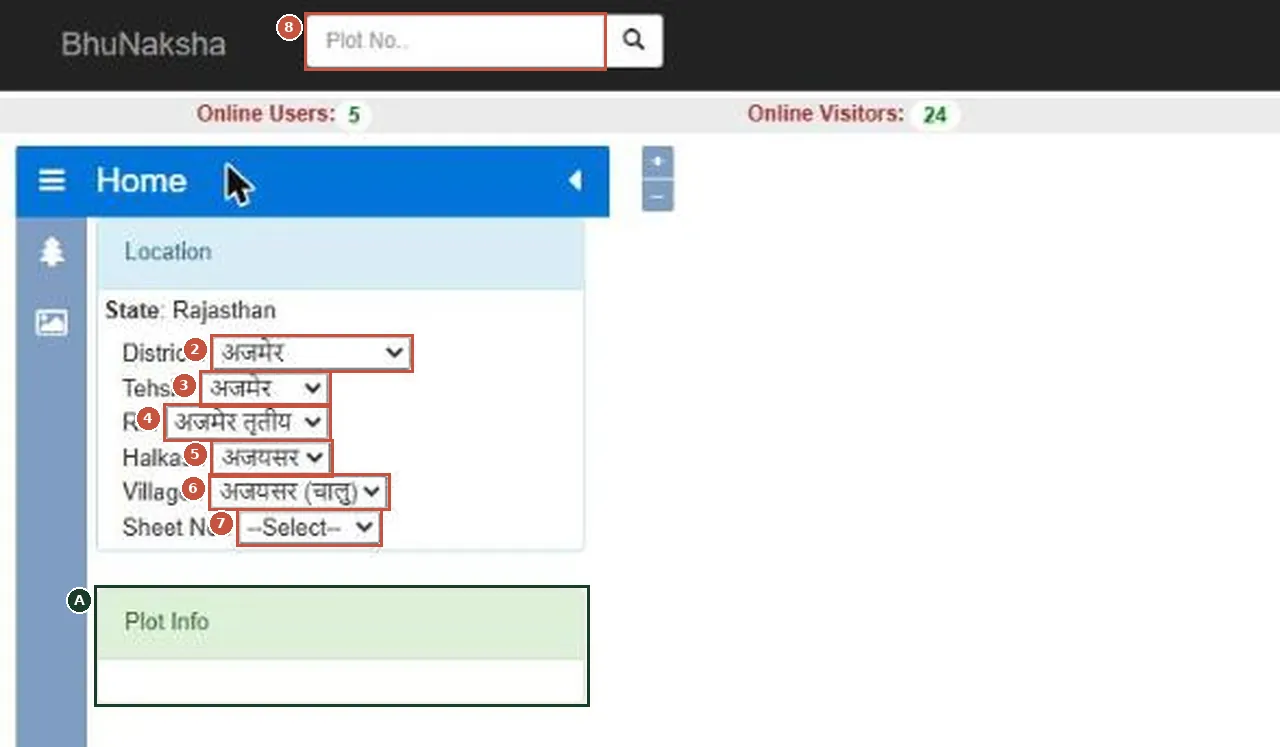
Viewmap: in the Location panel choose District, Tehsil, RI, Halka, Village and Sheet No. The village map opens on the right; type your khasra in Plot No. or tap it on the map, and Plot Info shows its details. Viewmap में ज़िला, तहसील, आरआई, हल्का, गाँव और शीट चुनें; फिर Plot No. में खसरा लिखें।Screenshot of the official portal, taken 15 November 2026. AgriZameen is not affiliated with it. - 2District
- 3Tehsil
- 4RI (revenue inspector circle)
- 5Halka
- 6Village
- 7Sheet No
- 8Plot No. (your khasra)
- APlot Info
After the last screen
- The next screen shows the jamabandi for the khasra you picked: the owners, their shares, the area and the remarks. Read the remarks and any charge entry yourself.
- Use the portal's own print or download, and keep the date. A copy shows the record on the day it is pulled.
- To see the khasra on the village map, use Bhu-Naksha (the last two screens above). We stop before the map itself, because it shows khasra numbers.
अपना खाता पर जमाबंदी नकल: होम पेज पर "जमाबंदी नकल" → ज़िला → तहसील → "ऑनलाइन जमाबन्दी" → गाँव → "जमाबंदी की प्रतिलिपि" → "वर्तमान नकल" → खाता/खसरा/नाम से खोज → खसरा चुनें। अगली स्क्रीन पर मालिकों के नाम और हिस्से दिखते हैं; रिमार्क और चार्ज की प्रविष्टि खुद पढ़ें। हर स्क्रीनशॉट 15 नवंबर 2026 को लिया गया है; नाम और नंबर हम प्रकाशित नहीं करते।
FAQ
Do I need a login to see a jamabandi copy on Apna Khata?
No login was asked for at any of the screens shown here, on 15 November 2026. An e-signed copy is a separate service.
Which option do I choose for today's record?
Online jamabandi, then Jamabandi copy, then Current copy (वर्तमान नकल).
Are these real screenshots?
Yes. They were taken on the official portal in a desktop browser on 15 November 2026. Names, record numbers, rate figures and the State Emblem are blurred by AgriZameen.
The portal looks different now. What should I do?
Portals change their screens. Follow the same menu names; if a step has moved, tell us on +91 70149 86988 and we will re-check the screens.
Sources
- Apna Khata, the Rajasthan revenue records portal, 15 November 2026: apnakhata.rajasthan.gov.in
- Bhu-Naksha Rajasthan (the village maps): bhunaksha.rajasthan.gov.in