The Farmer ID comes from the Rajasthan Farmer Registry (AgriStack); scheme applications go through Raj Kisan Saathi. This page shows both, screen by screen. For what a Farmer ID is — and is not — read Farmer Registry and Farmer ID. General information, not legal advice.
On screen, step by step
1 a step to doA another option check thisBlurred: names, numbers and emblems we do not publish
Open the Rajasthan Farmer Registry
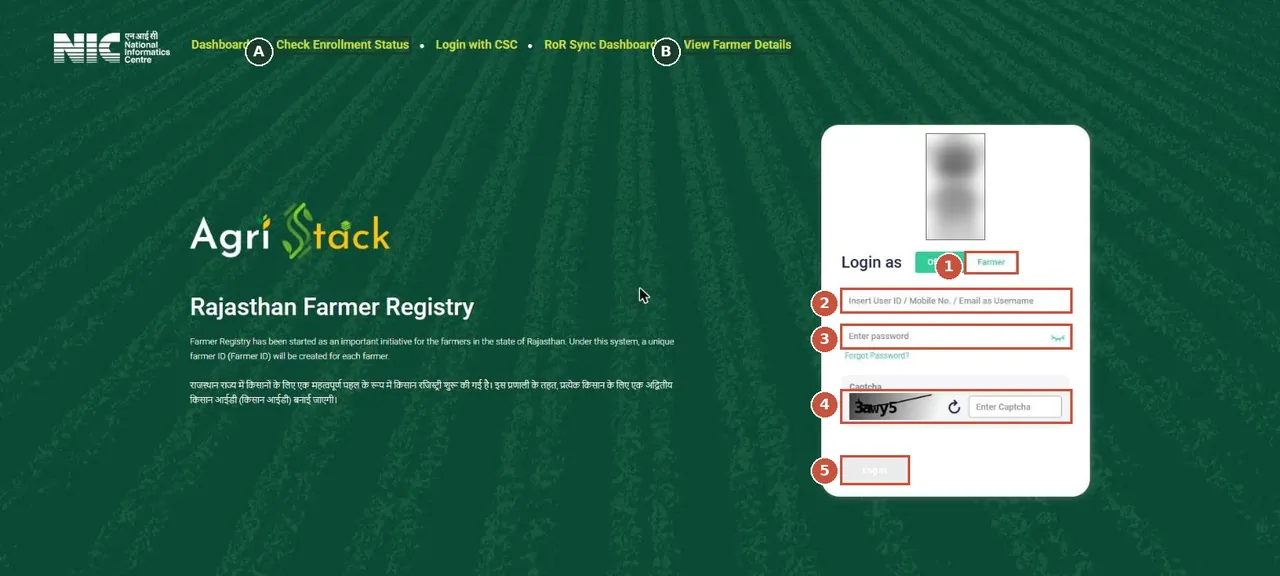
Rajasthan Farmer Registry (AgriStack), where the Farmer ID is made. Farmers log in with the Farmer tab; anyone can check enrolment status from the top menu. राजस्थान फार्मर रजिस्ट्री (एग्रीस्टैक): किसान "Farmer" टैब से लॉगिन करें।Screenshot of the official portal, taken 15 November 2026. AgriZameen is not affiliated with it. Parts are blurred by AgriZameen. - 1Login as Farmer
- 2Mobile number / user ID
- 3Password
- 4Captcha
- 5Log In
- ACheck Enrollment Status
- BView Farmer Details
Check enrolment status
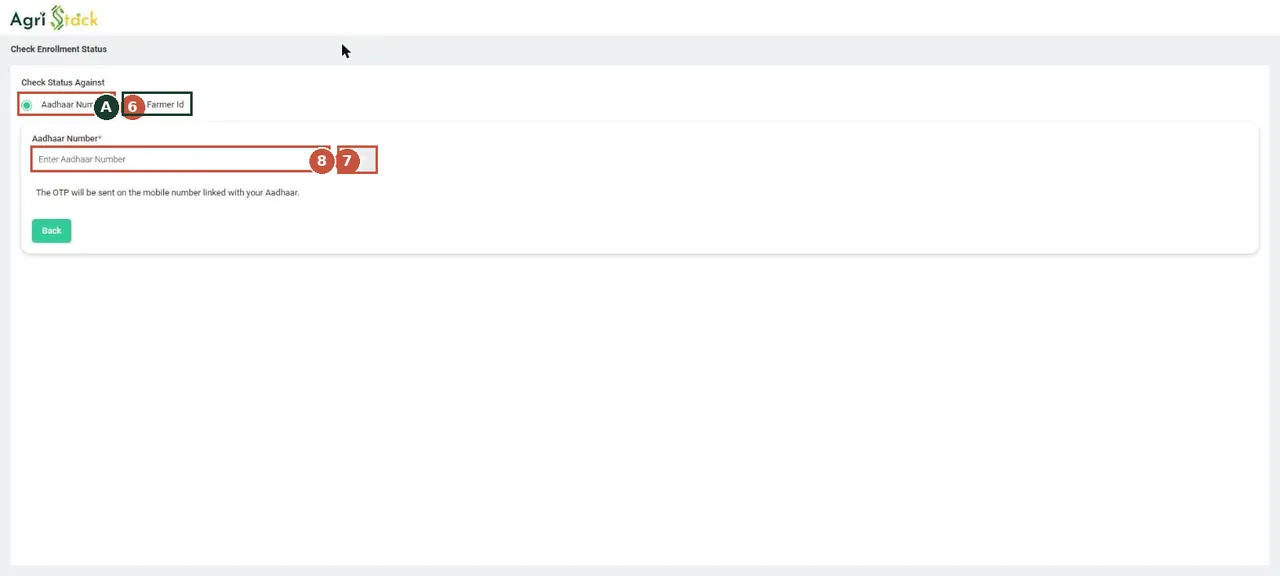
Check Enrollment Status: by Aadhaar number (an OTP goes to the Aadhaar-linked mobile) or by Farmer ID. नामांकन की स्थिति: आधार नंबर (ओटीपी) या फार्मर आईडी से देखें।Screenshot of the official portal, taken 15 November 2026. AgriZameen is not affiliated with it. - 6Aadhaar number
- AOr Farmer ID
- 7Type the number
- 8OTP (comes to your phone)
- Stop hereThe OTP comes to your phone and is yours to type. We never ask for an Aadhaar number or an OTP.
Raj Kisan Saathi: find the schemes
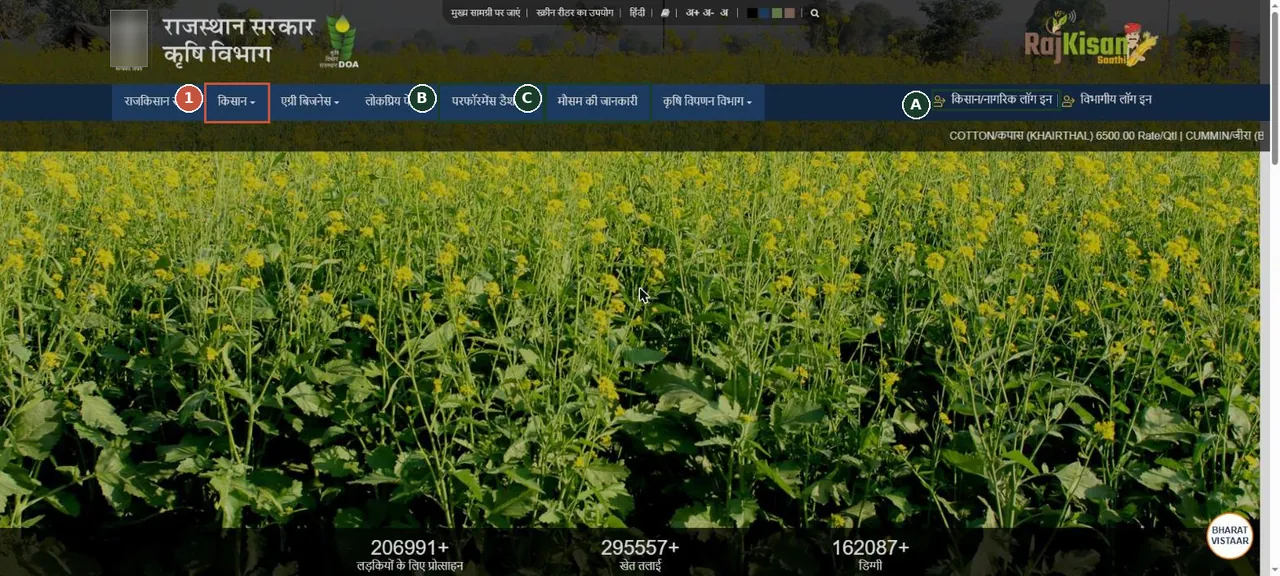
Raj Kisan Saathi (Agriculture Department, Rajasthan). Scheme details sit under the Kisan menu; applying needs the farmer login. राज किसान साथी: "किसान" मेन्यू में योजनाएँ; आवेदन के लिए किसान लॉगिन।Screenshot of the official portal, taken 15 November 2026. AgriZameen is not affiliated with it. Parts are blurred by AgriZameen. - 1किसान (Kisan) menu: schemes
- AFarmer / citizen login
- BPerformance dashboard
- CWeather
Read a scheme page before applying
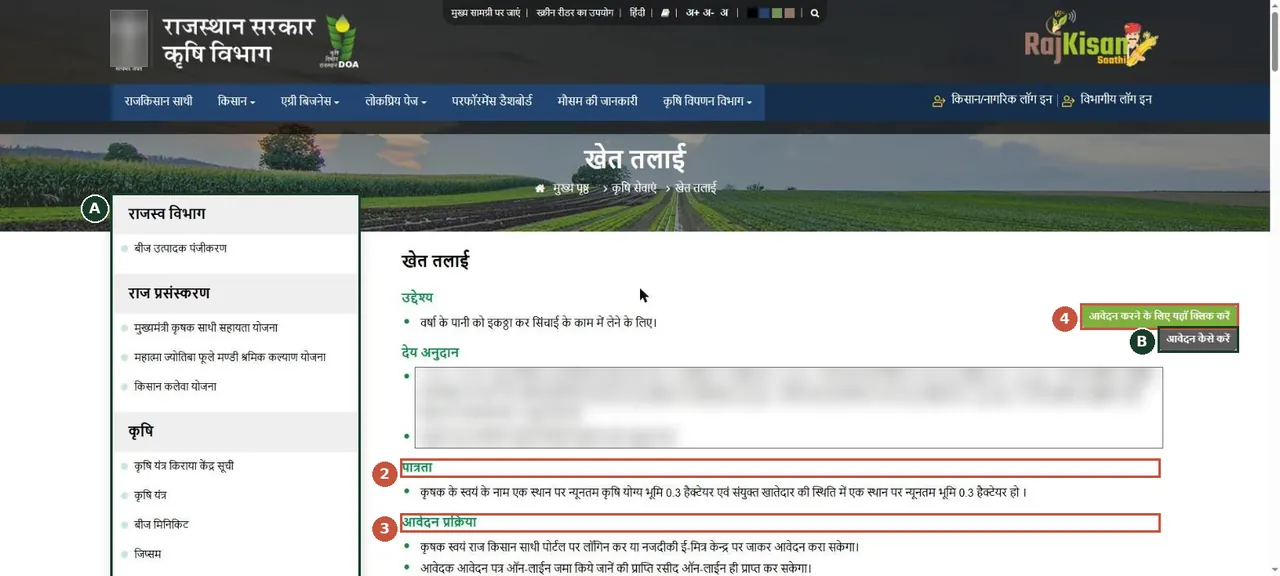
A scheme page (here खेत तलाई, farm pond). Each page lists the purpose, the subsidy, who is eligible and how to apply. The subsidy lines are blurred: read the current amount on the portal. योजना पेज: उद्देश्य, अनुदान, पात्रता और आवेदन प्रक्रिया; अनुदान की राशि पोर्टल पर पढ़ें।Screenshot of the official portal, taken 15 November 2026. AgriZameen is not affiliated with it. Parts are blurred by AgriZameen. - AOther schemes (side list)
- 2पात्रता: who is eligible
- 3आवेदन प्रक्रिया: how to apply
- 4Apply (needs farmer login)
- BHow to apply (video)
Farmer login to apply
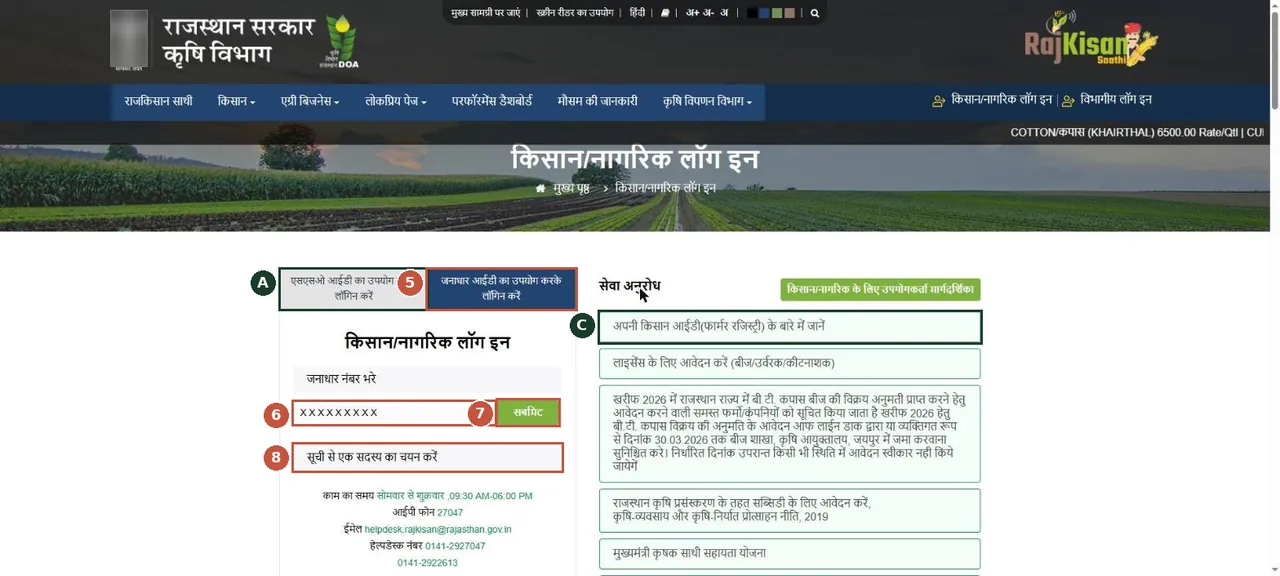
Farmer / citizen login. Choose SSO ID or Jan Aadhaar, type your Jan Aadhaar number, Submit, then pick the family member. You type these yourself. किसान लॉगिन: जन आधार नंबर डालें, सबमिट करें, फिर परिवार का सदस्य चुनें।Screenshot of the official portal, taken 15 November 2026. AgriZameen is not affiliated with it. Parts are blurred by AgriZameen. - ALogin with SSO ID
- 5Login with Jan Aadhaar
- 6Jan Aadhaar number
- 7Submit
- 8Pick the family member
- CAbout your Farmer ID
- Why it mattersScheme pages set conditions such as land in the farmer’s own name and a minimum area — the farm-pond page above does. A buyer who will farm the land should read them before buying.
What a Farmer ID is not
- It is not proof of title and not a land record. Ownership is in the jamabandi; check it on Apna Khata.
- Scheme subsidies and conditions change. Read the current figures on the scheme page; we print none.
फार्मर आईडी राजस्थान फार्मर रजिस्ट्री (एग्रीस्टैक) पर बनती है; नामांकन की स्थिति आधार (ओटीपी) या फार्मर आईडी से देखें। राज किसान साथी पर "किसान" मेन्यू में योजनाएँ हैं; आवेदन के लिए जन आधार या एसएसओ से किसान लॉगिन करें। फार्मर आईडी स्वामित्व का प्रमाण नहीं है। स्क्रीनशॉट 15 नवंबर 2026 के हैं।
FAQ
How do I check my Farmer ID enrolment status in Rajasthan?
On the Rajasthan Farmer Registry, open Check Enrollment Status and search by Aadhaar number (an OTP goes to the Aadhaar-linked mobile) or by Farmer ID.
Is a Farmer ID proof that I own the land?
No. Ownership is in the revenue record (jamabandi).
Are these real screenshots?
Yes. They were taken on the official portal in a desktop browser on 15 November 2026. Names, record numbers, rate figures and the State Emblem are blurred by AgriZameen.
The portal looks different now. What should I do?
Portals change their screens. Follow the same menu names; if a step has moved, tell us on +91 70149 86988 and we will re-check the screens.
Sources
- Rajasthan Farmer Registry (AgriStack), 15 November 2026: rjfr.agristack.gov.in
- Raj Kisan Saathi, Agriculture Department, Rajasthan: rajkisan.rajasthan.gov.in