Many land papers — an e-signed jamabandi copy, a certificate, a fee receipt — are applied for or paid at an e-Mitra kiosk. This page shows how to check a transaction and download a certificate on the e-Mitra site, screen by screen. General information, not legal advice.
On screen, step by step
1 a step to doA another option check thisBlurred: names, numbers and emblems we do not publish
Open e-Mitra: status and certificates
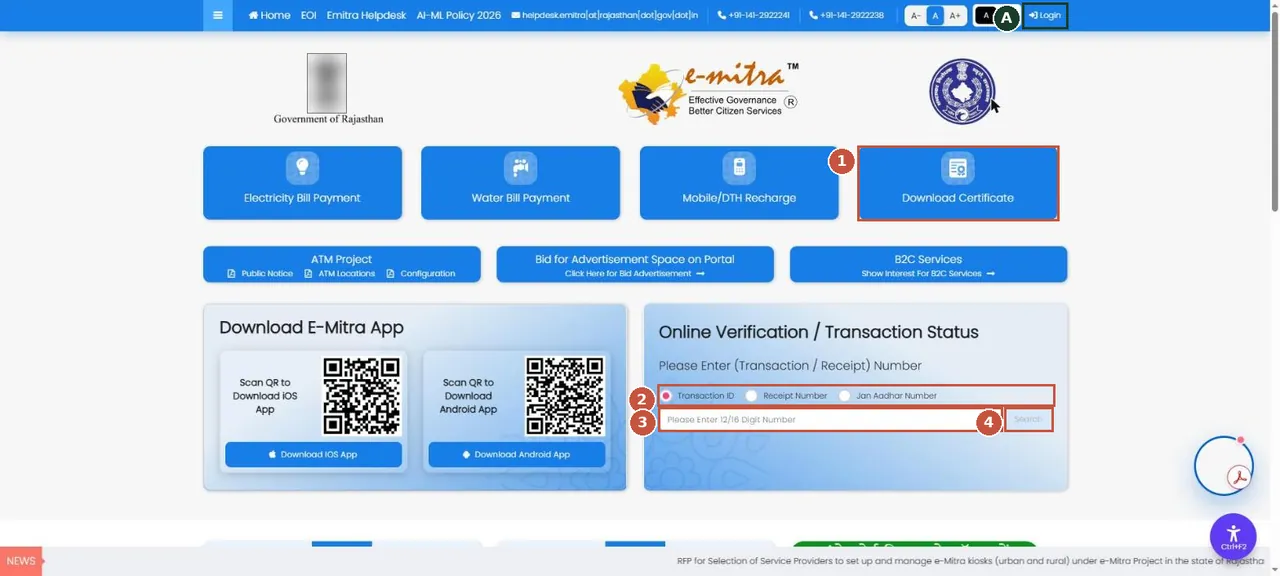
e-Mitra home (close the popup first). Download a certificate issued to you, or check an application or payment by its transaction or receipt number. ई-मित्र: प्रमाणपत्र डाउनलोड करें या रसीद नंबर से आवेदन की स्थिति देखें।Screenshot of the official portal, taken 15 November 2026. AgriZameen is not affiliated with it. Parts are blurred by AgriZameen. - 1Download Certificate
- 2Choose: transaction ID, receipt no. or Jan Aadhaar
- 3Type the number
- 4Search
- ALogin (SSO) for applying
Download a certificate
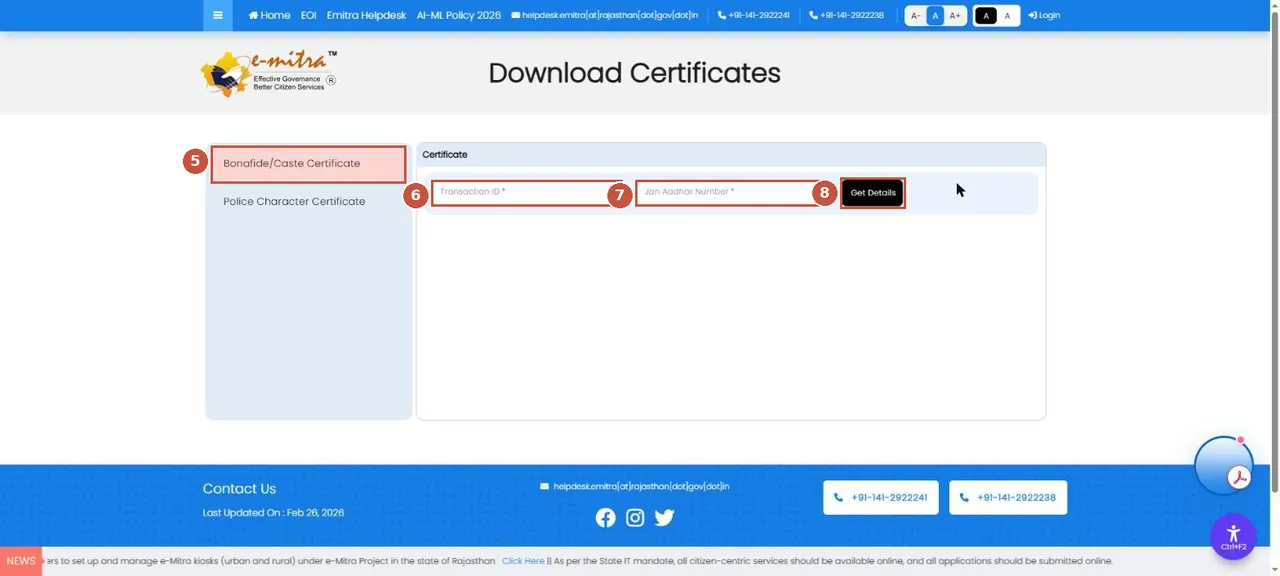
Download Certificates: pick the certificate type, then enter the transaction ID from your e-Mitra receipt and your Jan Aadhaar number. प्रमाणपत्र का प्रकार चुनें, फिर ट्रांज़ैक्शन आईडी और जन आधार नंबर डालें।Screenshot of the official portal, taken 15 November 2026. AgriZameen is not affiliated with it. - 5Certificate type
- 6Transaction ID (on your receipt)
- 7Jan Aadhaar number
- 8Get Details
- TipKeep every e-Mitra receipt. The transaction ID on it is what you need to check status or download the result.
- Stop hereThe details shown next are yours. We never ask for a Jan Aadhaar number, a receipt or an OTP.
- Why it mattersA certificate you can download and verify yourself is better than a photocopy handed over by someone else.
ई-मित्र: होम पेज पर पॉपअप बंद करें। ट्रांज़ैक्शन आईडी, रसीद नंबर या जन आधार से आवेदन/भुगतान की स्थिति देखें। "Download Certificate" में प्रमाणपत्र का प्रकार चुनें, फिर ट्रांज़ैक्शन आईडी और जन आधार नंबर डालें। स्क्रीनशॉट 15 नवंबर 2026 के हैं।
FAQ
How do I check an e-Mitra application?
On the e-Mitra home page, choose Transaction ID, Receipt Number or Jan Aadhaar Number under Online Verification, type it and press Search.
What do I need to download a certificate from e-Mitra?
The transaction ID on your e-Mitra receipt and your Jan Aadhaar number.
Are these real screenshots?
Yes. They were taken on the official portal in a desktop browser on 15 November 2026. Names, record numbers, rate figures and the State Emblem are blurred by AgriZameen.
The portal looks different now. What should I do?
Portals change their screens. Follow the same menu names; if a step has moved, tell us on +91 70149 86988 and we will re-check the screens.
Sources
- e-Mitra, Rajasthan, 15 November 2026: emitra.rajasthan.gov.in