Most Rajasthan land applications — 90-A conversion, lease deed and patta, name transfer, building plans, Raj Kisan schemes — begin at the state's single sign-on (SSO) page. This page shows the sign-in and the first-time registration screens, marked step by step. General information, not legal advice.
On screen, step by step
1 a step to doA another option check thisBlurred: names, numbers and emblems we do not publish
The SSO sign-in page

Rajasthan SSO sign-in. Most state applications (90-A, building plans, Raj Kisan, e-Mitra services) start here. Type these yourself; never share the password or OTP with anyone, AgriZameen included. राजस्थान एसएसओ: आईडी, पासवर्ड और कैप्चा खुद भरें; पासवर्ड या ओटीपी किसी को न बताएँ।Screenshot of the official portal, taken 15 November 2026. AgriZameen is not affiliated with it. - ARegistration (first time)
- 1SSO ID / username
- 2Password
- 3Captcha
- 4Login
- BForgot SSO ID or password
- Stop hereThe password, captcha and any OTP are yours to type. We never ask for, or type, anyone’s password or OTP.
First time: register
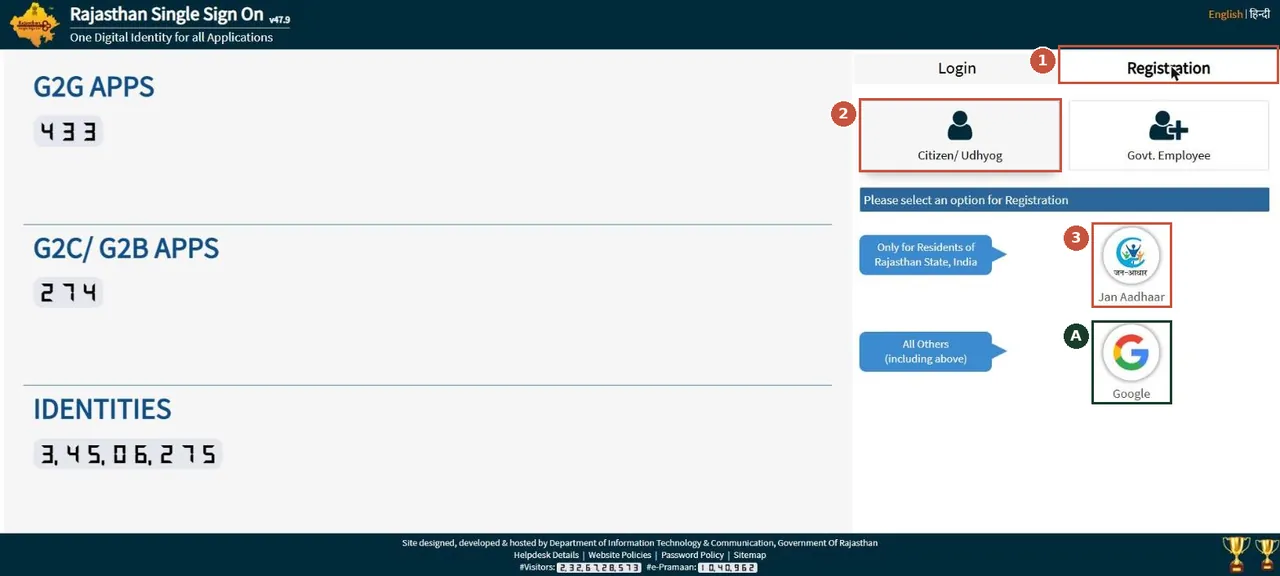
First time: open Registration, choose Citizen/Udhyog, then register with Jan Aadhaar (Rajasthan residents) or Google (everyone else). पहली बार: Registration → Citizen → जन आधार या Google से पंजीकरण।Screenshot of the official portal, taken 15 November 2026. AgriZameen is not affiliated with it. - 1Registration tab
- 2Citizen / Udhyog
- 3Jan Aadhaar (Rajasthan residents)
- AGoogle (all others)
- Why it mattersApplications are tied to your SSO ID. Use your own ID, not an agent’s, so the record, the receipts and the replies come to you.
Keep your SSO safe
- Your SSO ID and password open every application filed in your name. Type them yourself, on the official page only.
- Nobody, AgriZameen included, needs your password or OTP to help you. If someone asks for them, do not share them.
- If you forget the SSO ID or password, use the two "Click Here" links under the Login button.
राजस्थान एसएसओ: 90-ए, पट्टा, नामांतरण, भवन मानचित्र और राज किसान के आवेदन यहीं से शुरू होते हैं। पहली बार Registration → Citizen → जन आधार (राजस्थान निवासी) या Google। आईडी, पासवर्ड और कैप्चा खुद भरें; पासवर्ड या ओटीपी किसी को न बताएँ। स्क्रीनशॉट 15 नवंबर 2026 के हैं।
FAQ
How do I make a Rajasthan SSO ID?
Open Registration, choose Citizen / Udhyog, then register with Jan Aadhaar if you live in Rajasthan, or with Google otherwise.
Will AgriZameen sign in for me?
No. We never ask for, or type, anyone's password or OTP.
Are these real screenshots?
Yes. They were taken on the official portal in a desktop browser on 15 November 2026. Names, record numbers, rate figures and the State Emblem are blurred by AgriZameen.
The portal looks different now. What should I do?
Portals change their screens. Follow the same menu names; if a step has moved, tell us on +91 70149 86988 and we will re-check the screens.
Sources
- Rajasthan Single Sign On, 15 November 2026: sso.rajasthan.gov.in