Two ways to list land on AgriZameen: send the basics on WhatsApp and the team calls you back, or fill the form yourself, in two steps. These are the real screens, marked step by step. Your khasra number, name, exact location and phone are never shown on the site. Listing carries no brokerage.
On screen, step by step
1 a step to doA another option check thisBlurred: names, numbers and emblems we do not publish
Open List your land
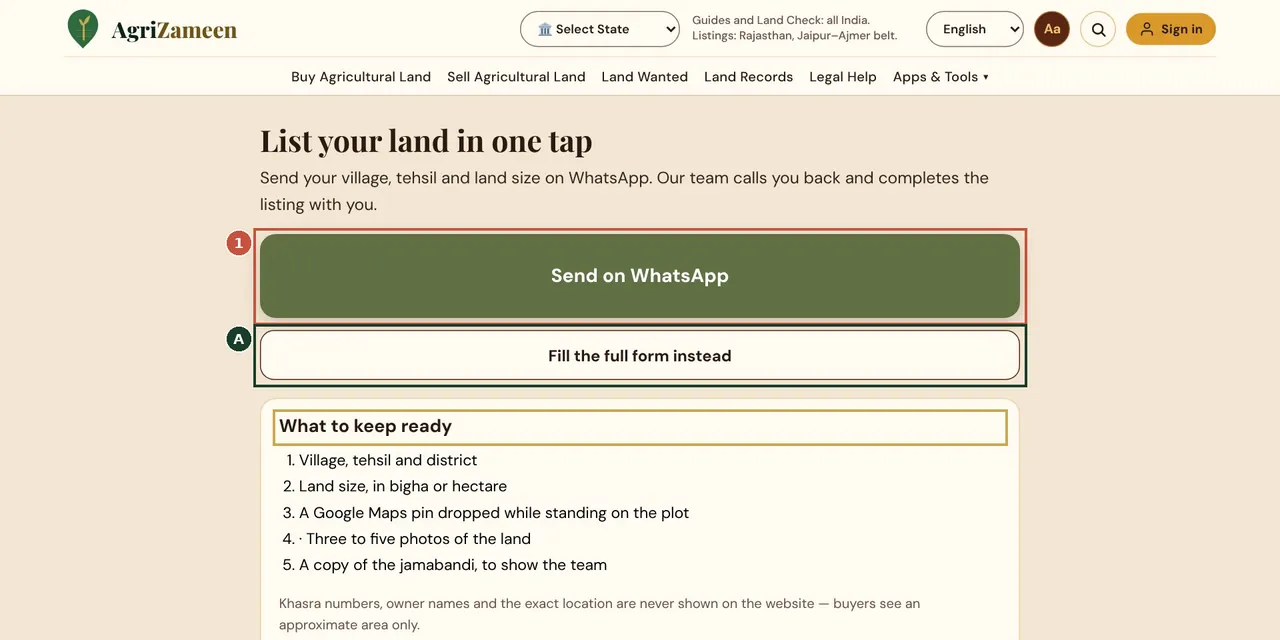
AgriZameen “List your land” page. The quick way: send your village, tehsil and land size on WhatsApp and the team calls you back. Or fill the full form yourself. एग्रीज़मीन की स्क्रीन: लाल अंक वाले क़दम क्रम से करें; हरे अक्षर दूसरे विकल्प हैं। खाते वाली स्क्रीन में नमूना खाता है।Screenshot of AgriZameen’s own screen, taken 15 November 2026. Sample data where an account is shown. - 1Send on WhatsApp
- AOr fill the full form
- Keep these ready
Signed in: New listing
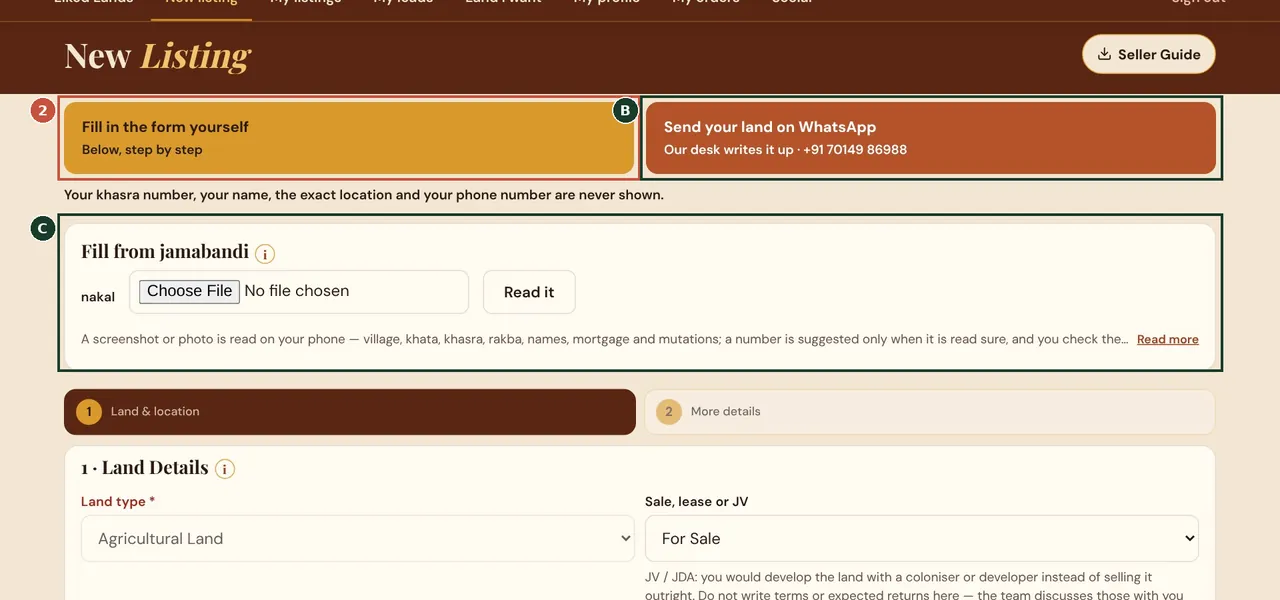
Signed in, open New listing. Choose “Fill in the form yourself”. Optionally read a photo of your jamabandi to fill fields; your khasra, name, exact location and phone are never shown. एग्रीज़मीन की स्क्रीन: लाल अंक वाले क़दम क्रम से करें; हरे अक्षर दूसरे विकल्प हैं। खाते वाली स्क्रीन में नमूना खाता है।Screenshot of AgriZameen’s own screen, taken 15 November 2026. Sample data where an account is shown. - 2Fill in the form yourself
- BOr WhatsApp the desk
- COptional: read your jamabandi
Section 1: land details
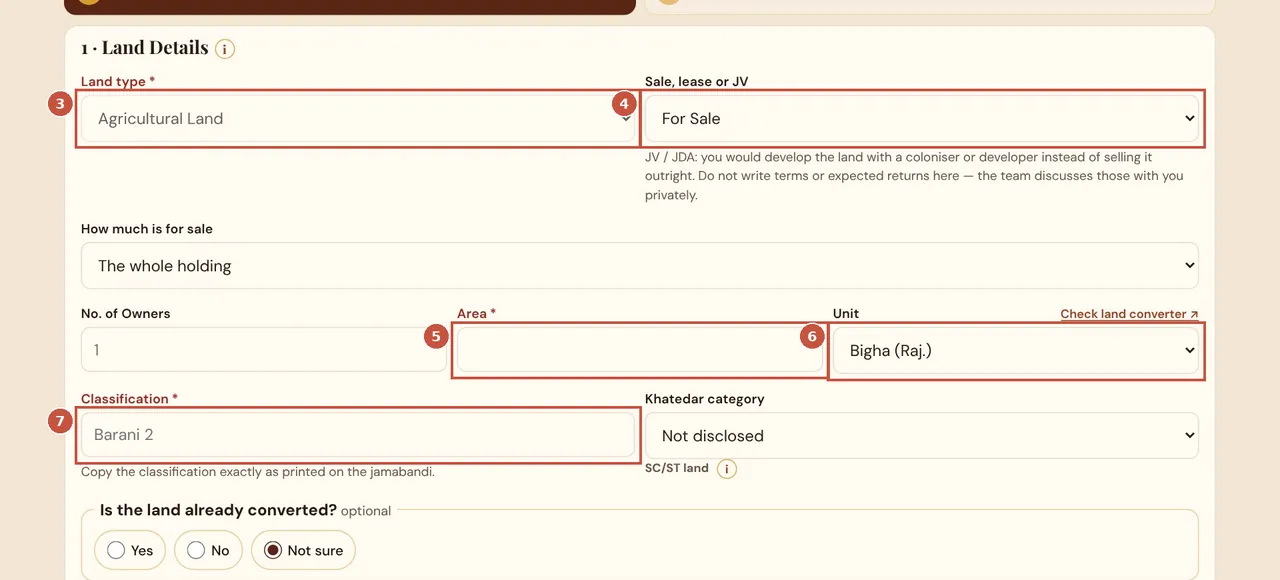
Section 1, Land details: land type, sale or lease, how much is for sale, owners, area with its unit, and the classification exactly as printed on the jamabandi. एग्रीज़मीन की स्क्रीन: लाल अंक वाले क़दम क्रम से करें; हरे अक्षर दूसरे विकल्प हैं। खाते वाली स्क्रीन में नमूना खाता है।Screenshot of AgriZameen’s own screen, taken 15 November 2026. Sample data where an account is shown. - 3Land type
- 4Sale, lease or JV
- 5Area
- 6Unit
- 7Classification
Records and location, then Next
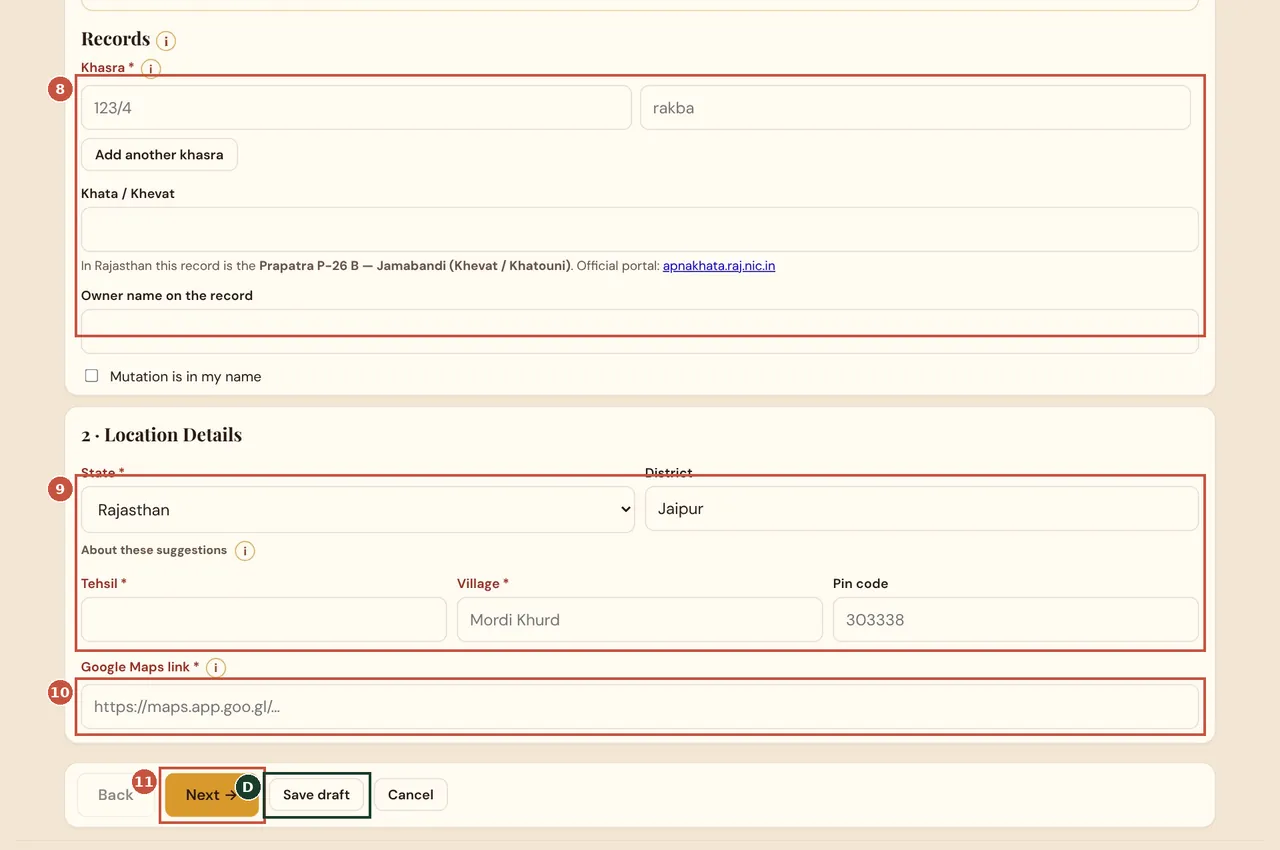
Records and location: khasra, khata and owner name stay private with the team. Then state, district, tehsil, village and a Google Maps link. Next goes to step 2; Save draft keeps it for later. एग्रीज़मीन की स्क्रीन: लाल अंक वाले क़दम क्रम से करें; हरे अक्षर दूसरे विकल्प हैं। खाते वाली स्क्रीन में नमूना खाता है।Screenshot of AgriZameen’s own screen, taken 15 November 2026. Sample data where an account is shown. - 8Records (kept private)
- 9Where the land is
- 10Google Maps link
- 11Next
- DSave draft
Step 2: more details and the price
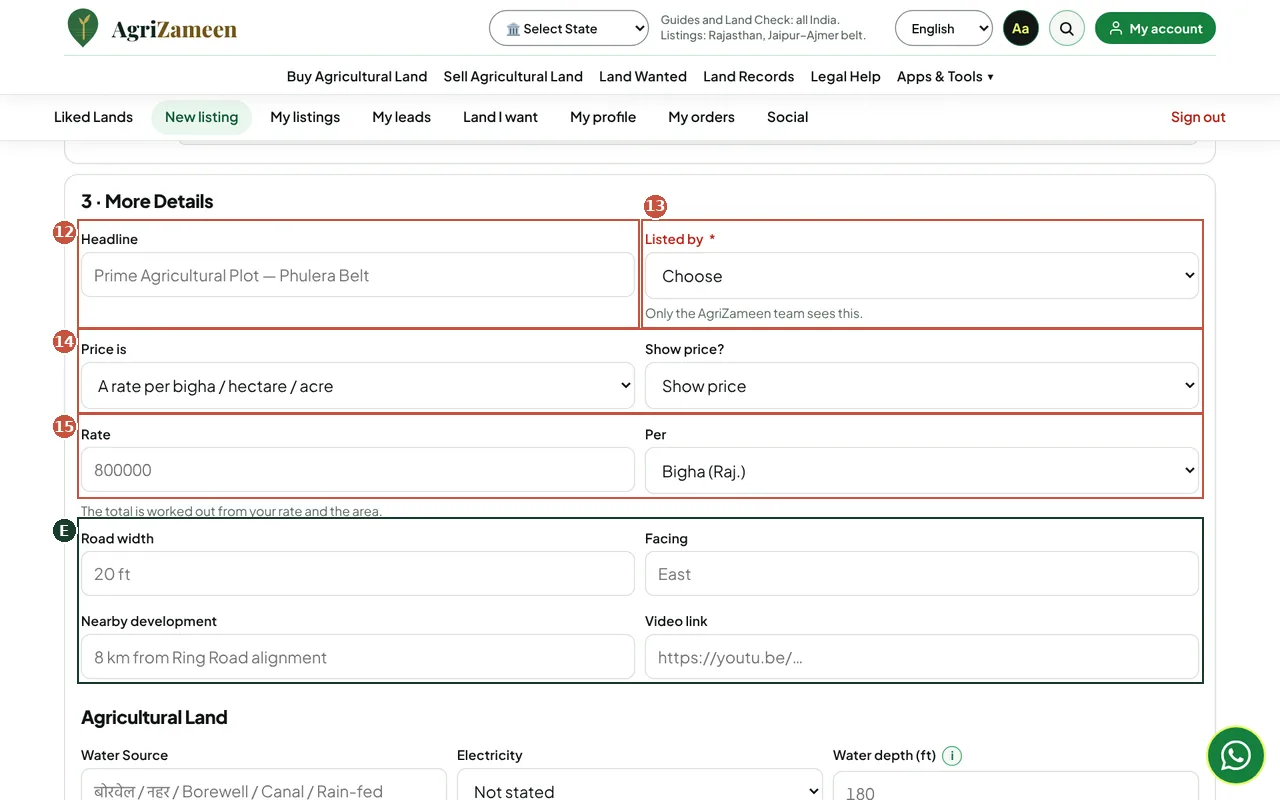
Step 2 of the form, More details: a headline, who is listing it, how the price is given and whether it is shown. The total is worked out from your rate and the area. एग्रीज़मीन की स्क्रीन: लाल अंक वाले क़दम क्रम से करें; हरे अक्षर दूसरे विकल्प हैं। खाते वाली स्क्रीन में नमूना खाता है।Screenshot of AgriZameen’s own screen, taken 16 November 2026. Sample data where an account is shown. - 12Headline
- 13Listed by: only the team sees it
- 14How the price is given, and whether it shows
- 15Rate and unit
- EOptional: road, facing, nearby, video
Land facts, as you declare them

Land facts, as you declare them: water source, power, road access, open sides and boundary. Buyers can filter by them. Not sure? Leave it: it shows as Not declared. एग्रीज़मीन की स्क्रीन: लाल अंक वाले क़दम क्रम से करें; हरे अक्षर दूसरे विकल्प हैं। खाते वाली स्क्रीन में नमूना खाता है।Screenshot of AgriZameen’s own screen, taken 16 November 2026. Sample data where an account is shown. - Land facts, shown as you declared them
- 16Water source: tick all that apply
- 17Power, road, sides, boundary
Photos, the two ticks, then Review

Add site photos, tick the two declarations, then Review. Save draft keeps the form to finish later. The team reviews every listing before it is public. एग्रीज़मीन की स्क्रीन: लाल अंक वाले क़दम क्रम से करें; हरे अक्षर दूसरे विकल्प हैं। खाते वाली स्क्रीन में नमूना खाता है।Screenshot of AgriZameen’s own screen, taken 16 November 2026. Sample data where an account is shown. - 18Site photos
- 19The details are true
- 20Listing terms and privacy policy
- 21Review
- FSave draft
- GBack to step 1
- Sample dataSigned-in screens on this page show sample accounts and sample listings made for this guide on a test copy of the site. Your own screens show your details.
- Before you pay anythingAgriZameen charges no brokerage on listing or buying. Never pay a token to anyone who says they are from AgriZameen; check the papers on the official portals and take advice from an advocate.
Good to know
- AgriZameen is an independent, private platform, not a government body.
- Listing and buying carry no brokerage. Never pay a token to anyone who says they are from AgriZameen.
- Land information here is for due diligence, not a promise of any return. Verify every record on the official portal.
एग्रीज़मीन की असली स्क्रीन, हर क़दम पर निशान के साथ: लाल अंक = करने वाला क़दम, हरे अक्षर = दूसरा विकल्प। खाते वाली स्क्रीन में नमूना खाता है। लिस्टिंग और खरीद पर कोई ब्रोकरेज नहीं। स्क्रीनशॉट 15–16 नवंबर 2026 के हैं।
FAQ
Are these real screenshots of AgriZameen?
Yes, taken on 15 and 16 November 2026. Signed-in screens use sample accounts on a test copy of the site, so no real person's details appear.
A screen looks different on my phone. What should I do?
On a phone the same items stack in one column and some menus sit behind a button. Follow the same names; if a step has moved, tell us on +91 70149 86988.
Does AgriZameen charge brokerage?
No. Listing and buying through AgriZameen carry no brokerage. Never pay a token to anyone who says they are from AgriZameen.
Is AgriZameen a government website?
No. AgriZameen is an independent, private platform run by Vision Global Ventures LLP, not affiliated with any government department.
Sources
- List your land, 15 November 2026: agrizameen.com