Before you pay a booking amount in a colony or group-housing project, check that the project is registered with RERA Rajasthan. This page shows how, screen by screen. Every screenshot is real and marked; project and promoter names are blurred because the example is only to show the screens. For what RERA covers, read what RERA is. General information, not legal advice.
On screen, step by step
1 a step to doA another option check thisBlurred: names, numbers and emblems we do not publish
Open RERA Rajasthan and search projects by district

RERA Rajasthan home page. Projects tab is already selected in the search box. रेरा राजस्थान: "Projects" में ज़िला चुनकर "Search" दबाएँ।Screenshot of the official portal, taken 15 November 2026. AgriZameen is not affiliated with it. Parts are blurred by AgriZameen. - 1Projects tab
- 2District
- 3Tehsil
- AProject name (optional)
- 4Search
- BHome Buyer menu
- TipOn 15 November 2026 the Tehsil list did not fill after we chose the district. Search by district alone, then narrow with the filters on the next page.
Find the project and its registration number
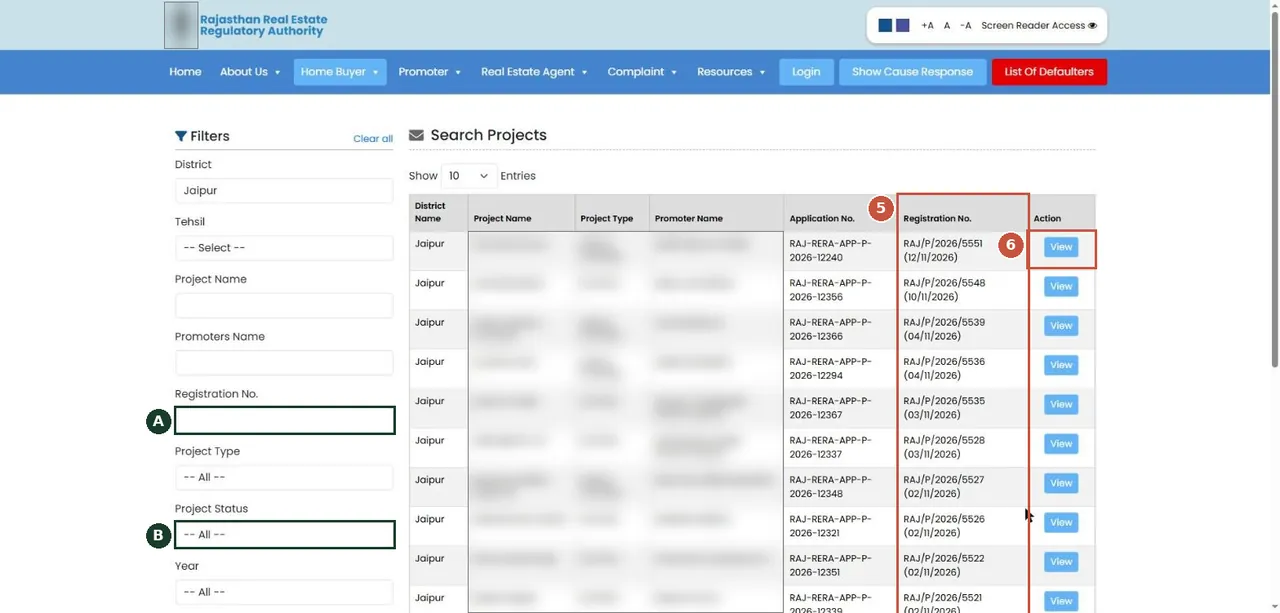
Project list for the district. Project and promoter names are blurred here; on the portal you see them in full. प्रोजेक्ट सूची: पंजीकरण संख्या और तारीख़ देखें, फिर "View"।Screenshot of the official portal, taken 15 November 2026. AgriZameen is not affiliated with it. Parts are blurred by AgriZameen. - 5Registration No. and date
- 6View
- ASearch by registration no.
- BProject status filter
Open the project and read its registration and status
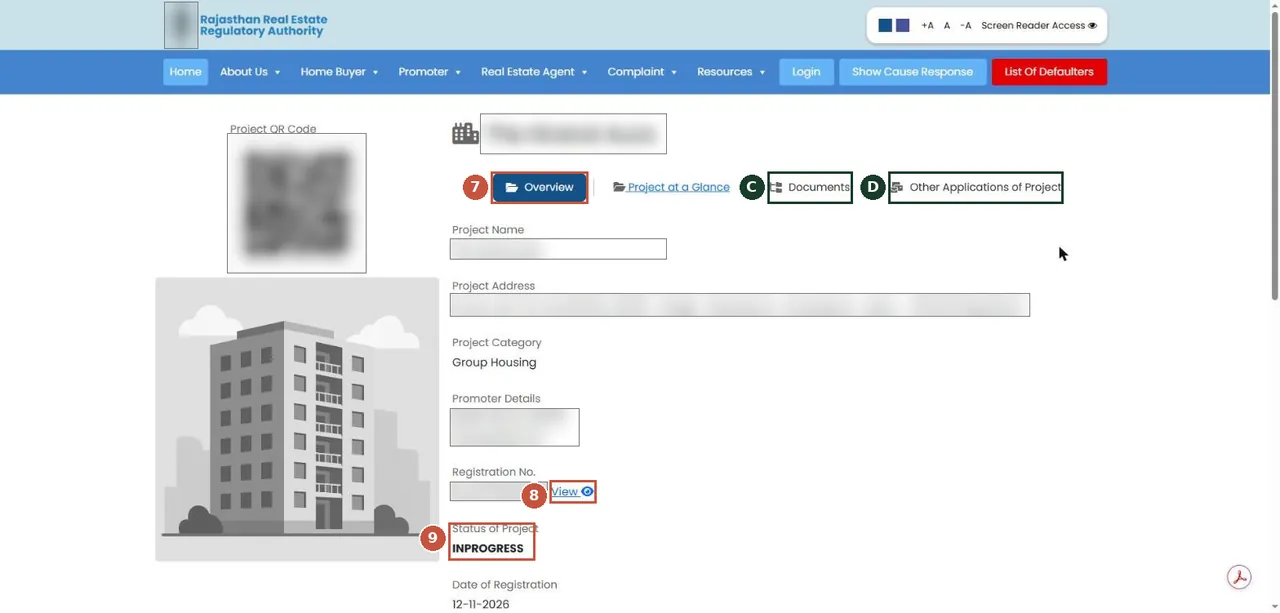
Project detail page. Name, address (it carries khasra numbers), promoter and QR are blurred here. प्रोजेक्ट का विवरण: पंजीकरण प्रमाणपत्र, स्थिति और दस्तावेज़ यहीं मिलते हैं।Screenshot of the official portal, taken 15 November 2026. AgriZameen is not affiliated with it. Parts are blurred by AgriZameen. - 7Overview
- 8View registration certificate
- 9Status of project
- CDocuments (approvals, title, plans)
- DOther applications (extensions, changes)
- Why it mattersA registered project has its approvals and the promoter’s details on record with the regulator, and the buyer can complain to RERA if promises are not kept.
If something is wrong: the complaint menu
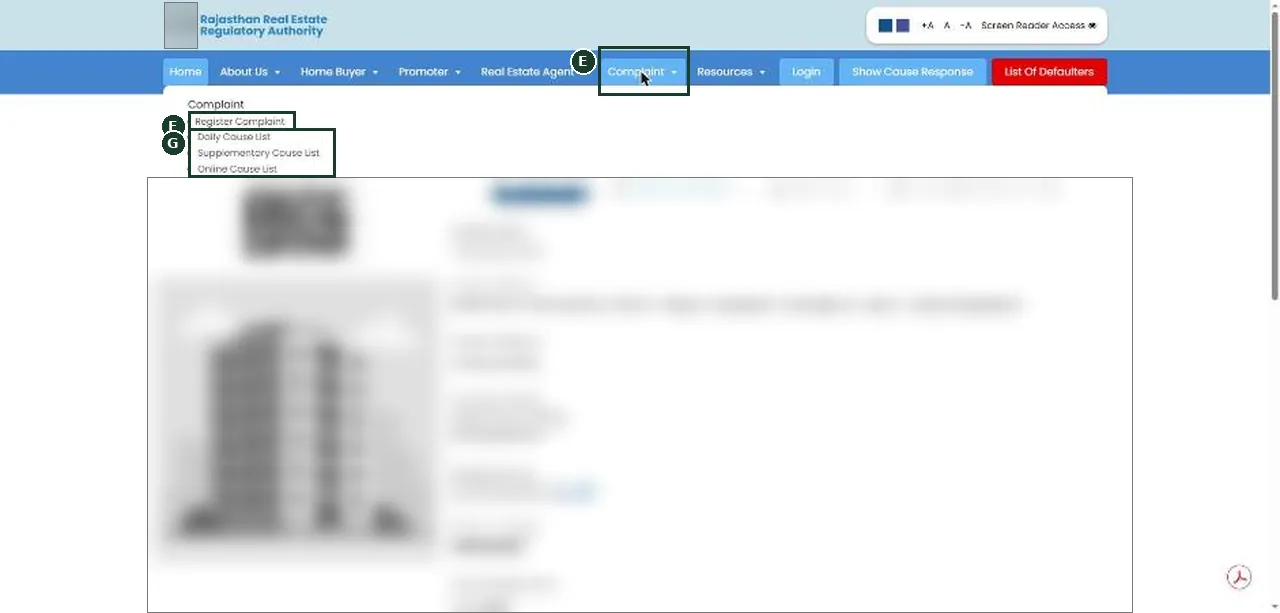
Complaint menu. Register Complaint needs an SSO login; the cause lists are public. शिकायत दर्ज करने के लिए SSO लॉगिन चाहिए; कॉज़ लिस्ट सबके लिए खुली है।Screenshot of the official portal, taken 15 November 2026. AgriZameen is not affiliated with it. Parts are blurred by AgriZameen. - EComplaint menu
- FRegister Complaint (SSO login)
- GCause lists (public)
- Stop hereRegistering a complaint needs your own SSO login. We never ask for, or type, anyone’s password or OTP.
What to match
- The registration number and date on the portal against the brochure, the agreement and the site board.
- The project's status (in progress, completed, revoked, suspended or lapsed — the status filter lists these).
- The documents tab: approvals, title papers and plans the promoter has uploaded.
- Farmland bought directly from a farmer is not a RERA project. RERA applies to real estate projects as the Act defines them; ask an advocate if you are unsure which side your purchase falls on.
रेरा राजस्थान पर प्रोजेक्ट जाँच: होम पेज पर "Projects" → ज़िला → "Search" → सूची में पंजीकरण संख्या और तारीख़ → "View" → विवरण पेज पर पंजीकरण प्रमाणपत्र, स्थिति और "Documents"। बुकिंग राशि देने से पहले ब्रोशर और अनुबंध से मिलान करें। स्क्रीनशॉट 15 नवंबर 2026 के हैं।
FAQ
Do I need a login to search RERA Rajasthan projects?
No. The project search and the project pages opened without a login on 15 November 2026. Filing a complaint needs an SSO login.
What if the project is not on the list?
Search by the registration number the promoter gives you. If it is not found, ask the promoter in writing and take advice before paying.
Are these real screenshots?
Yes. They were taken on the official portal in a desktop browser on 15 November 2026. Names, record numbers, rate figures and the State Emblem are blurred by AgriZameen.
The portal looks different now. What should I do?
Portals change their screens. Follow the same menu names; if a step has moved, tell us on +91 70149 86988 and we will re-check the screens.
Sources
- Rajasthan Real Estate Regulatory Authority, 15 November 2026: rera.rajasthan.gov.in