Odisha’s official land-record and registration portals, one marked screenshot at a time: Bhulekh Odisha. Red numbers are the steps; green letters are other options. For what to check in Odisha and the laws behind it, read our Odisha guide. General information, not legal advice.
On screen, step by step
1 a step to doA another option check thisBlurred: names, numbers and emblems we do not publish
Bhulekh Odisha: select location for RoR
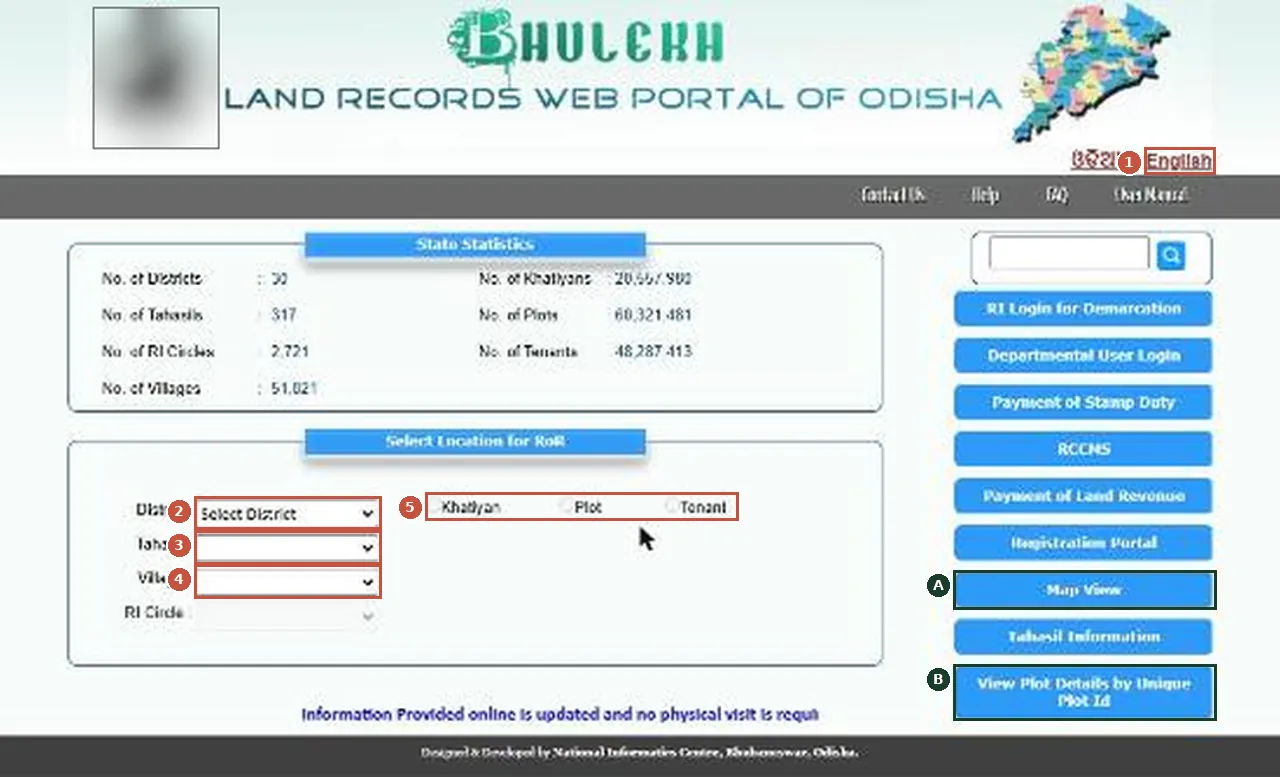
Bhulekh Odisha: Select Location for RoR. Pick district, tahasil and village, then search by khatiyan, plot or tenant. ओडिशा: स्क्रीन पर लाल अंक वाले क़दम क्रम से करें; हरे अक्षर दूसरे विकल्प हैं।Screenshot of the official portal, taken 15 November 2026. AgriZameen is not affiliated with it. Parts are blurred by AgriZameen. - 1English
- 2District
- 3Tahasil
- 4Village
- 5Search by khatiyan, plot or tenant
- AMap View
- BPlot details by unique plot ID
- Stop hereCaptchas, OTPs, passwords and payments are yours to do on the official site. We never ask for them and never type them for anyone.
- Why it mattersMatch what the record shows — names, area, record numbers, charges — with the seller’s papers before any token money, and take advice from a local advocate.
Before you rely on it
- Use only the official addresses shown in each screenshot's caption, typed yourself.
- Save or print what the portal shows, with the date; records change.
- An online copy is information. For a sale, get the certified copy the state issues and take advice from a local advocate.
ओडिशा के भूमि रिकॉर्ड और पंजीकरण पोर्टल, हर स्क्रीन पर निशान के साथ: लाल अंक क़दम हैं, हरे अक्षर दूसरे विकल्प। कैप्चा, ओटीपी, पासवर्ड और भुगतान आप खुद करें। रिकॉर्ड को विक्रेता के कागज़ों से मिलाएँ और स्थानीय वकील की सलाह लें। स्क्रीनशॉट 15 नवंबर 2026 के हैं।
FAQ
Where do I check land records in Odisha online?
On the official portals shown on this page: Bhulekh Odisha. Each screenshot is marked step by step.
Is an online copy enough for buying land in Odisha?
No. It is information. Get the certified copy the state issues and take advice from a local advocate.
Are these real screenshots?
Yes. They were taken on the official portal in a desktop browser on 15 November 2026. Names, record numbers, rate figures and the State Emblem are blurred by AgriZameen.
The portal looks different now. What should I do?
Portals change their screens. Follow the same menu names; if a step has moved, tell us on +91 70149 86988 and we will re-check the screens.
Sources
- Bhulekh Odisha, 15 November 2026: bhulekh.ori.nic.in