Haryana’s official land-record and registration portals, one marked screenshot at a time: Revenue Haryana portal, Jamabandi Haryana, Town and Country Planning, Haryana. Red numbers are the steps; green letters are other options. For what to check in Haryana and the laws behind it, read our Haryana guide. General information, not legal advice.
On screen, step by step
1 a step to doA another option check thisBlurred: names, numbers and emblems we do not publish
Revenue Haryana: free Jamabandi Nakal (information copy)
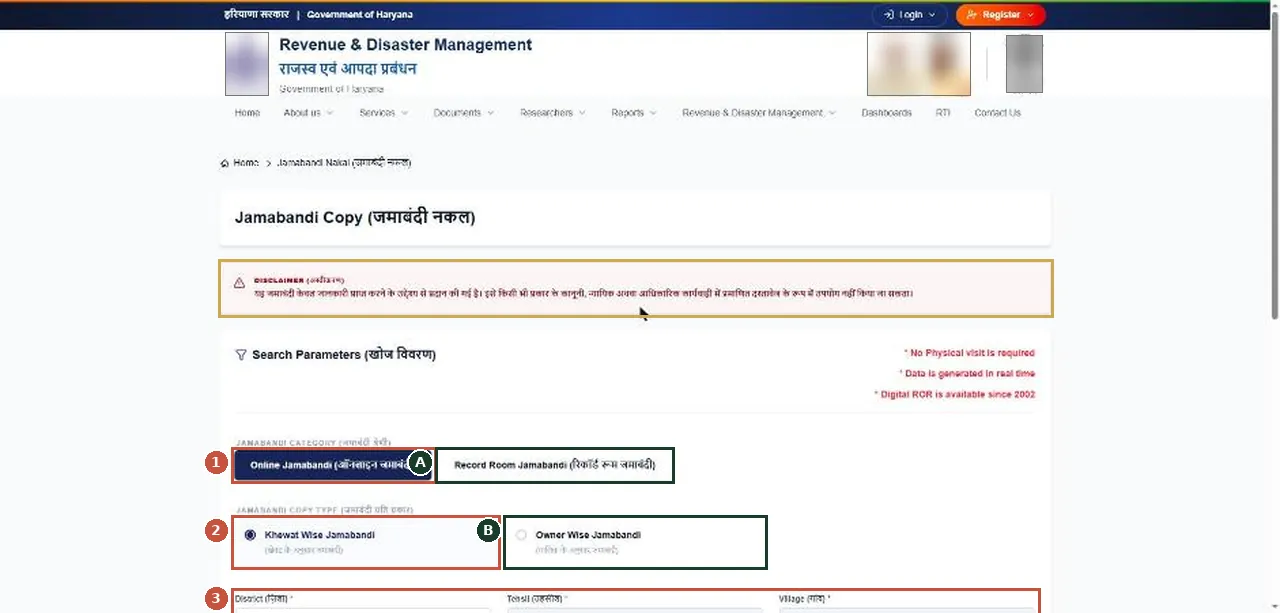
Jamabandi Nakal page on the Revenue Haryana portal: a free information copy, no login. The red note on the page says this copy cannot be used as a certified document. हरियाणा: स्क्रीन पर लाल अंक वाले क़दम क्रम से करें; हरे अक्षर दूसरे विकल्प हैं।Screenshot of the official portal, taken 15 November 2026. AgriZameen is not affiliated with it. Parts are blurred by AgriZameen. - Information copy only
- 1Online Jamabandi
- AOlder years: Record Room
- 2Khewat wise
- BOr owner wise
- 3District, tehsil, village
Revenue Haryana: register or log in for certified copies
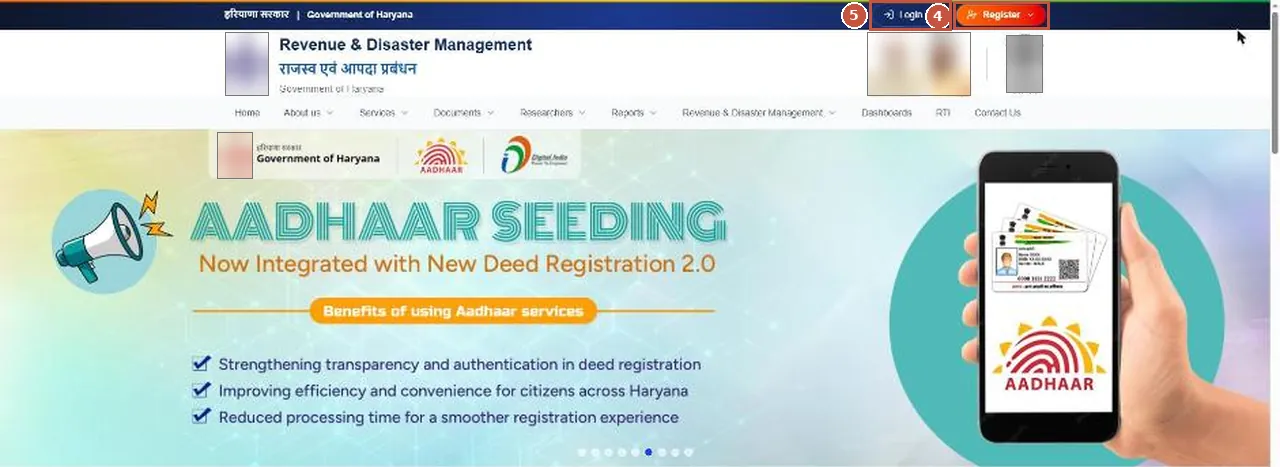
Revenue Haryana portal home page. First time, use Register to make a citizen account; after that, Login. The certified-copy service is inside the citizen account. हरियाणा: स्क्रीन पर लाल अंक वाले क़दम क्रम से करें; हरे अक्षर दूसरे विकल्प हैं।Screenshot of the official portal, taken 15 November 2026. AgriZameen is not affiliated with it. Parts are blurred by AgriZameen. - 4Register (first time)
- 5Login
Revenue Haryana: citizen login with mobile and OTP
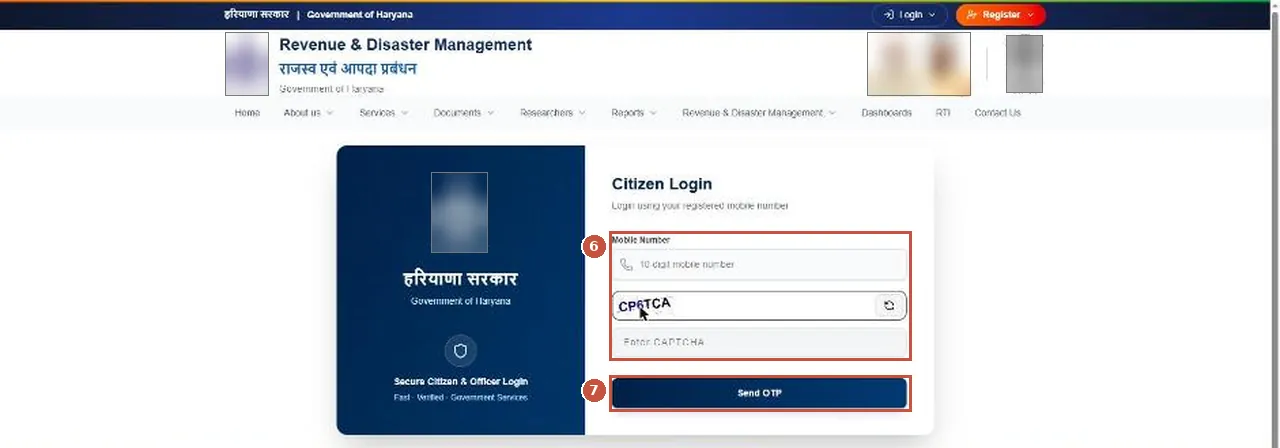
Citizen Login works with your registered mobile number, a captcha and an OTP sent to that phone. You enter all three yourself; never share the OTP with anyone. हरियाणा: स्क्रीन पर लाल अंक वाले क़दम क्रम से करें; हरे अक्षर दूसरे विकल्प हैं।Screenshot of the official portal, taken 15 November 2026. AgriZameen is not affiliated with it. Parts are blurred by AgriZameen. - 6Mobile number and captcha
- 7Send OTP
Jamabandi Haryana: nakal for checking
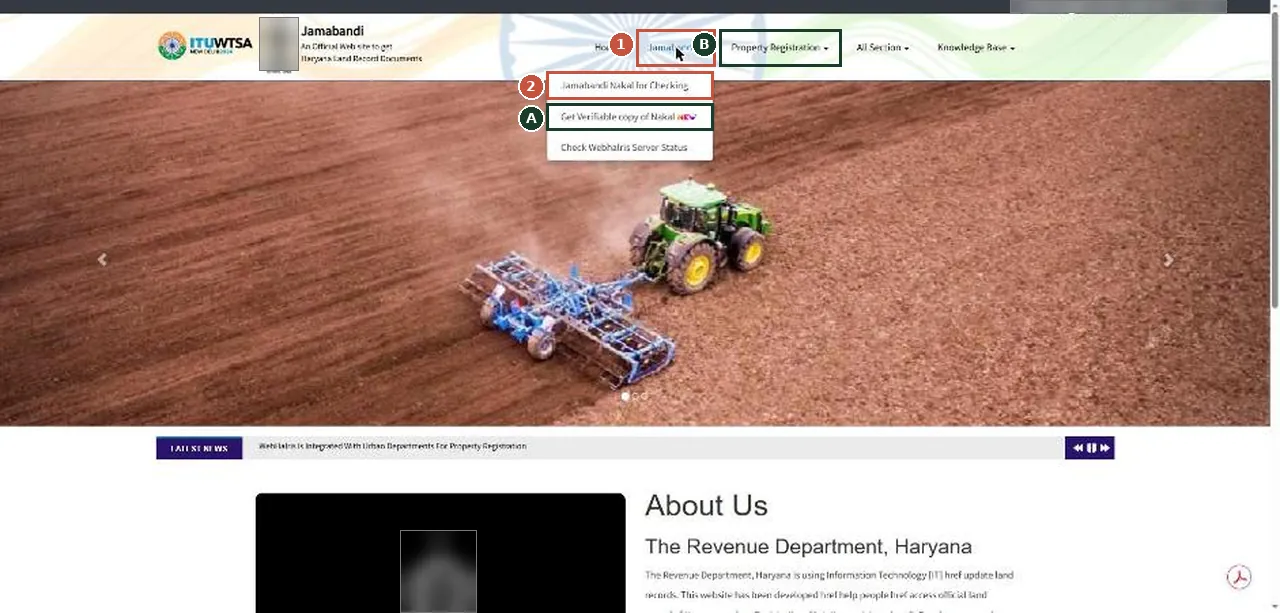
Jamabandi Haryana (Revenue Department). Hover on Jamabandi: the first item shows the nakal for checking; a verifiable copy is the second. हरियाणा: स्क्रीन पर लाल अंक वाले क़दम क्रम से करें; हरे अक्षर दूसरे विकल्प हैं।Screenshot of the official portal, taken 15 November 2026. AgriZameen is not affiliated with it. Parts are blurred by AgriZameen. - 1Jamabandi menu
- 2Jamabandi nakal for checking
- AVerifiable copy of nakal
- BProperty Registration menu
Town and Country Planning: CLU and development plans

Town and Country Planning, Haryana. The centre panel is for change of land use (CLU); development plans and the list of CLU cases are on the left; e-services on the right. हरियाणा: स्क्रीन पर लाल अंक वाले क़दम क्रम से करें; हरे अक्षर दूसरे विकल्प हैं।Screenshot of the official portal, taken 15 November 2026. AgriZameen is not affiliated with it. Parts are blurred by AgriZameen. - 1Grant of CLU permission
- ADevelopment plan list
- BList of CLU cases
- CList of e-services
- DNew user: register
- Stop hereCaptchas, OTPs, passwords and payments are yours to do on the official site. We never ask for them and never type them for anyone.
- Why it mattersMatch what the record shows — names, area, record numbers, charges — with the seller’s papers before any token money, and take advice from a local advocate.
Before you rely on it
- Use only the official addresses shown in each screenshot's caption, typed yourself.
- Save or print what the portal shows, with the date; records change.
- An online copy is information. For a sale, get the certified copy the state issues and take advice from a local advocate.
हरियाणा के भूमि रिकॉर्ड और पंजीकरण पोर्टल, हर स्क्रीन पर निशान के साथ: लाल अंक क़दम हैं, हरे अक्षर दूसरे विकल्प। कैप्चा, ओटीपी, पासवर्ड और भुगतान आप खुद करें। रिकॉर्ड को विक्रेता के कागज़ों से मिलाएँ और स्थानीय वकील की सलाह लें। स्क्रीनशॉट 15 नवंबर 2026 के हैं।
FAQ
Where do I check land records in Haryana online?
On the official portals shown on this page: Revenue Haryana portal, Jamabandi Haryana, Town and Country Planning, Haryana. Each screenshot is marked step by step.
Is an online copy enough for buying land in Haryana?
No. It is information. Get the certified copy the state issues and take advice from a local advocate.
Are these real screenshots?
Yes. They were taken on the official portal in a desktop browser on 15 November 2026. Names, record numbers, rate figures and the State Emblem are blurred by AgriZameen.
The portal looks different now. What should I do?
Portals change their screens. Follow the same menu names; if a step has moved, tell us on +91 70149 86988 and we will re-check the screens.
Sources
- Revenue Haryana portal, 15 November 2026: revenueharyana.gov.in