CERSAI is where lenders record mortgages, including those made by depositing title deeds. This page shows the public search screen by screen. Every screenshot is real and marked. Read the CERSAI guide first: for farmland, a clear CERSAI search is one check among four, not the answer. General information, not legal advice.
On screen, step by step
1 a step to doA another option check thisBlurred: names, numbers and emblems we do not publish
Open CERSAI and close the popup
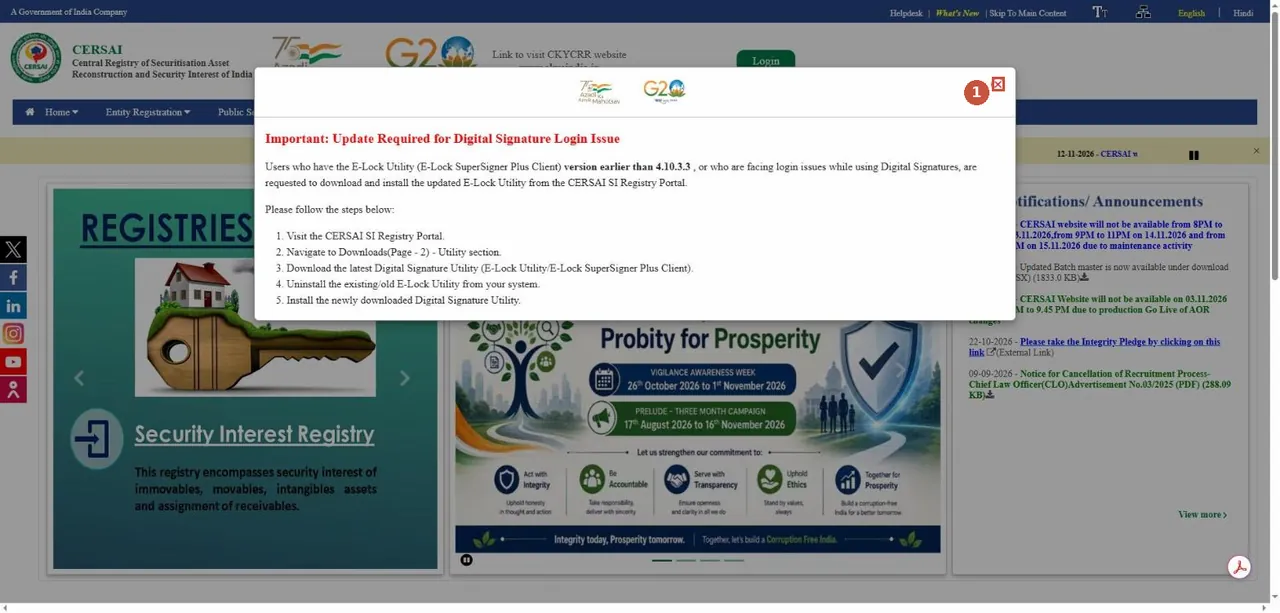
CERSAI home page. A notice popup often opens first; close it with the X. सेरसाई होम पेज। पॉपअप खुले तो X से बंद करें।Screenshot of the official portal, taken 15 November 2026. AgriZameen is not affiliated with it. - 1Close the popup
Public Search, then Asset Based Search

Hover on Public Search in the blue menu bar. "Public Search" पर जाएँ और "Asset Based Search" चुनें।Screenshot of the official portal, taken 15 November 2026. AgriZameen is not affiliated with it. - 2Public Search
- 3Asset Based Search
- ABorrower Based Search
The empty search form
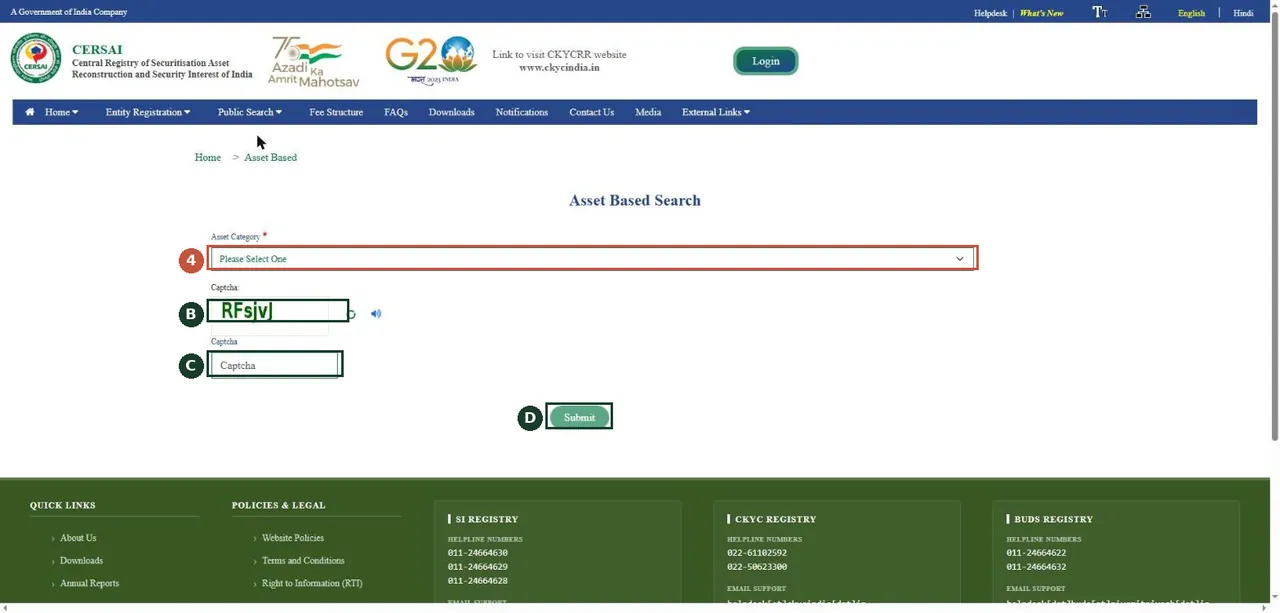
Asset Based Search opens with one dropdown, a captcha and Submit. पहले "Asset Category" चुनें।Screenshot of the official portal, taken 15 November 2026. AgriZameen is not affiliated with it. - 4Asset Category
- BCaptcha image
- CType the captcha
- DSubmit
Choose Immovable and Others; enter the survey number
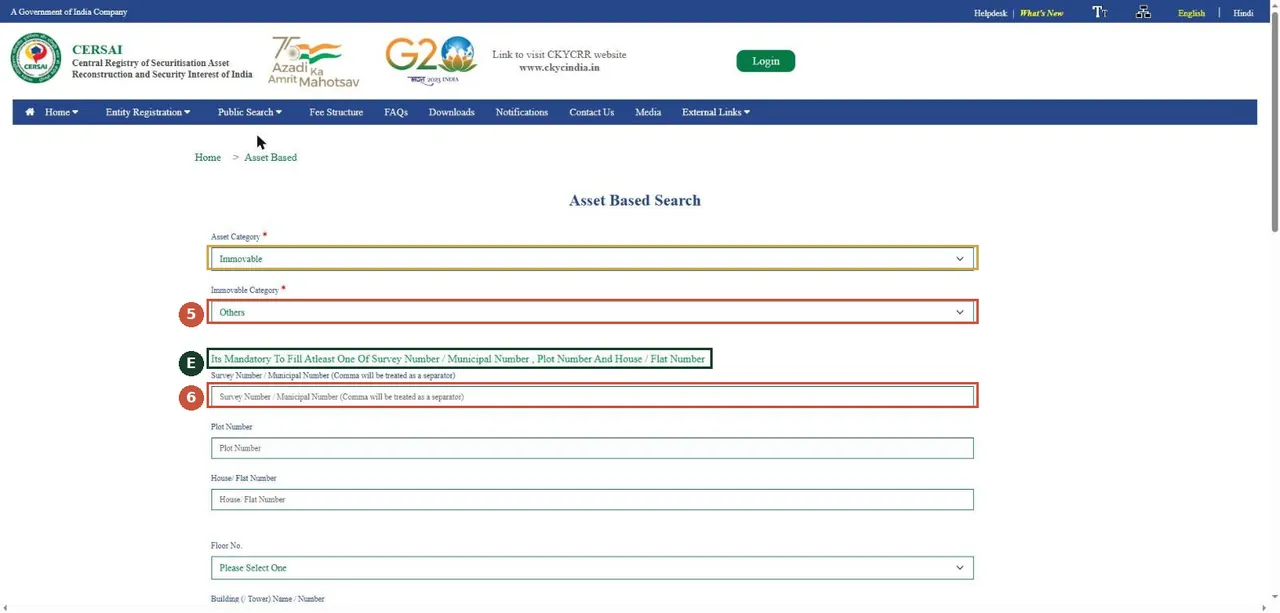
Choose Immovable, then the immovable category. For farm land pick Others; there is no agricultural option. "Immovable" और फिर "Others" चुनें; सर्वे नंबर में अपना खसरा लिखें।Screenshot of the official portal, taken 15 November 2026. AgriZameen is not affiliated with it. - Asset Category: Immovable (step 4)
- 5Immovable Category: Others
- EFill at least one of these numbers
- 6Survey number (your khasra)
- TipEnter the land as its deeds describe it. A lender may have used a different description, so run the borrower search too.
Fill state, district and village

Scroll down. State, District, City/Town/Village and Pin Code are compulsory. राज्य, ज़िला और शहर/गाँव भरना ज़रूरी है।Screenshot of the official portal, taken 15 November 2026. AgriZameen is not affiliated with it. - 7State
- 8District
- 9City / Town / Village
Pin code, captcha, Submit

Fill Pin Code, type the captcha and press Submit. The fee is paid on the next screen. पिन कोड और कैप्चा भरकर "Submit"; अगली स्क्रीन पर शुल्क देना होता है।Screenshot of the official portal, taken 15 November 2026. AgriZameen is not affiliated with it. - 10Pin Code
- 11Captcha
- 12Submit, then pay the search fee
- Stop hereThe captcha and the payment are yours to do. We never solve a captcha or make a payment for anyone.
Second route: Borrower Based Search
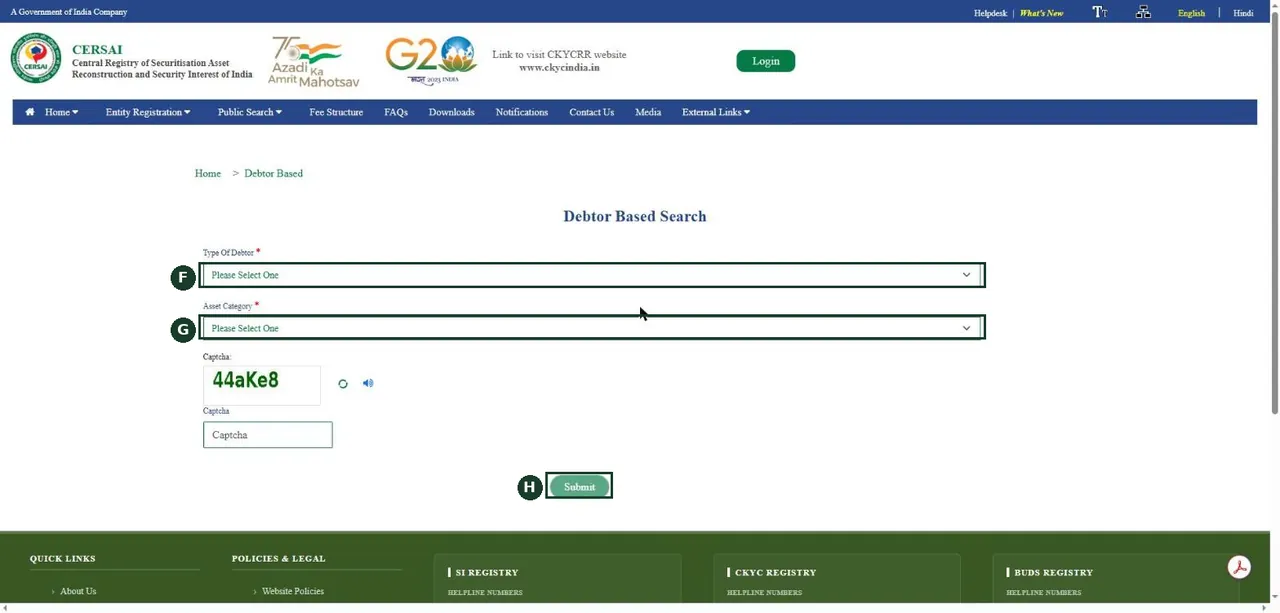
Second route: Borrower (Debtor) Based Search, using the borrower’s details — the seller, if the land is in the seller’s name. दूसरा तरीका: कर्ज़दार (विक्रेता) के विवरण से खोज।Screenshot of the official portal, taken 15 November 2026. AgriZameen is not affiliated with it. - FType of Debtor (Individual, HUF, company...)
- GAsset Category
- HSubmit
The fee page

Fee Structure page. Row 5 is the public search fee. शुल्क तालिका: पंक्ति 5 सार्वजनिक खोज का शुल्क है।Screenshot of the official portal, taken 15 November 2026. AgriZameen is not affiliated with it. - ISearch for an information in CERSAI
- Why it mattersA mortgage made by depositing title deeds is not registered as a deed, so an encumbrance search can miss it. CERSAI is where lenders record it.
What the fee page said
On 15 November 2026 the CERSAI fee structure page listed "Search for an information in CERSAI" at Rs. 10, excluding tax. Check the page again on the day you search; the portal shows the fee before you pay.
Read the result
- A charge found: ask the seller and the lender, and get the bank's no-dues letter, the original deeds back and the release recorded before you pay.
- Nothing found: it means only that nothing matched the details you searched, on that date. For farmland, read the jamabandi and search e-Panjiyan as well.
सेरसाई पर खोज: "Public Search" → "Asset Based Search" → "Immovable" → "Others" → सर्वे नंबर में खसरा → राज्य, ज़िला, शहर/गाँव, पिन कोड → कैप्चा → "Submit" → शुल्क। दूसरा तरीका: कर्ज़दार के विवरण से खोज। 15 नवंबर 2026 को शुल्क तालिका में सार्वजनिक खोज का शुल्क 10 रुपये (कर अलग) लिखा था। खेती की ज़मीन के लिए जमाबंदी और ई-पंजीयन भी देखें।
FAQ
Which category do I choose for farmland on CERSAI?
Immovable, then Others. On 15 November 2026 the immovable categories were Residential, Commercial and Others; there was no agricultural option.
What is the CERSAI search fee?
The fee structure page read on 15 November 2026 listed Rs. 10, excluding tax, for a search. Check it again before you pay.
Are these real screenshots?
Yes. They were taken on the official portal in a desktop browser on 15 November 2026. Names, record numbers, rate figures and the State Emblem are blurred by AgriZameen.
The portal looks different now. What should I do?
Portals change their screens. Follow the same menu names; if a step has moved, tell us on +91 70149 86988 and we will re-check the screens.
Sources
- CERSAI, the Central Registry, 15 November 2026: www.cersai.org.in