On a listing page you can save the land, compare it and send an enquiry. The AgriZameen team screens every enquiry and calls you; the seller does not get your number from the form. Liked Lands keeps everything you saved and sent. Screens marked step by step; the listing and account shown are samples.
On screen, step by step
1 a step to doA another option check thisBlurred: names, numbers and emblems we do not publish
Save or compare a listing

A listing page (sample listing). Save this land keeps it in your account; Compare puts it beside others. The photo label says when it is not the plot’s own photo. एग्रीज़मीन की स्क्रीन: लाल अंक वाले क़दम क्रम से करें; हरे अक्षर दूसरे विकल्प हैं। खाते वाली स्क्रीन में नमूना खाता है।Screenshot of AgriZameen’s own screen, taken 15 November 2026. Sample data where an account is shown. - 1Save this land
- ACompare
- Label on the photo
Send an enquiry

Enquire about this land: your name and mobile are needed; tick the consent box, then Enquire. The AgriZameen team screens every enquiry and calls you; sellers do not get your number from the form. एग्रीज़मीन की स्क्रीन: लाल अंक वाले क़दम क्रम से करें; हरे अक्षर दूसरे विकल्प हैं। खाते वाली स्क्रीन में नमूना खाता है।Screenshot of AgriZameen’s own screen, taken 15 November 2026. Sample data where an account is shown. - 2Your name
- 3Mobile
- 4Tick consent
- 5Enquire
- BOr WhatsApp
- CCheck the papers
Follow it in Liked Lands
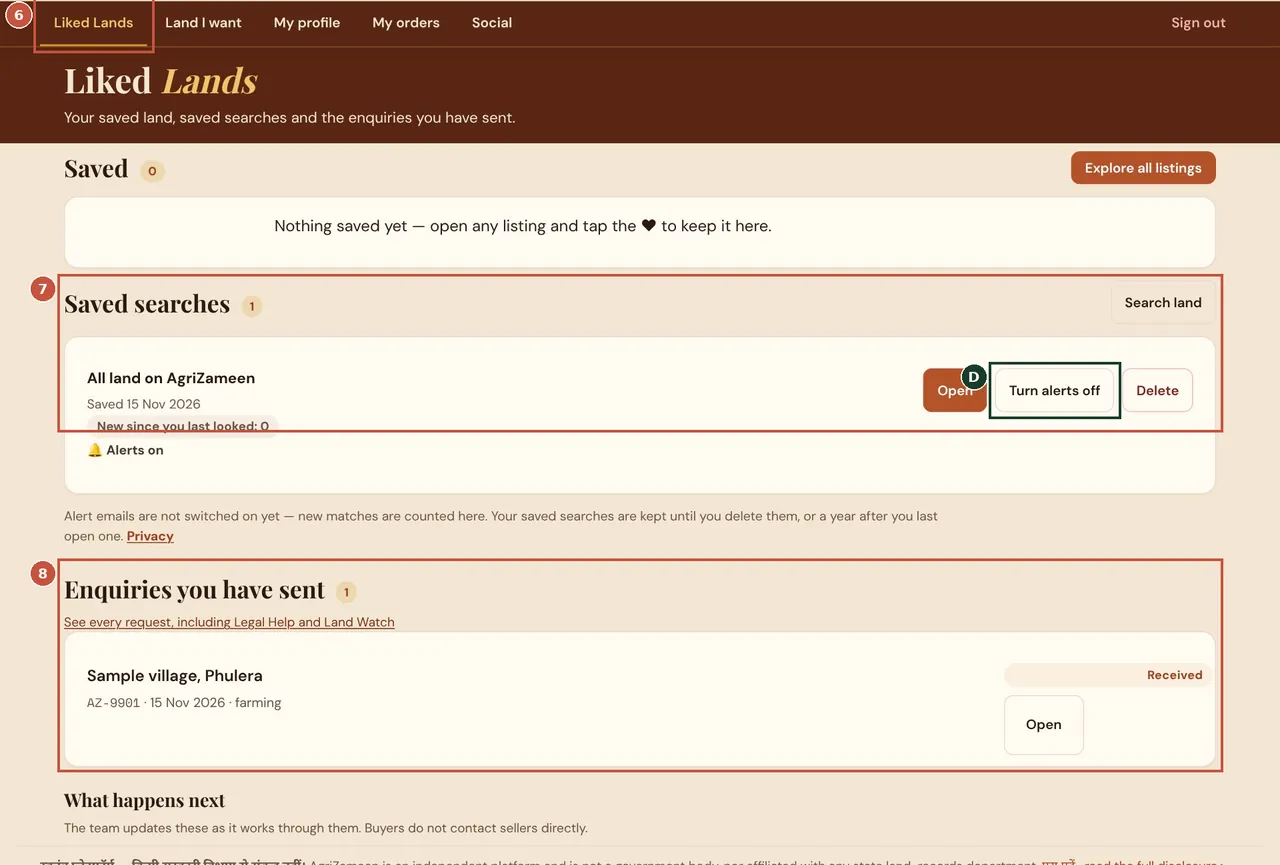
Liked Lands keeps your saved land, saved searches with alerts, and every enquiry you have sent with its status. Sample account shown. एग्रीज़मीन की स्क्रीन: लाल अंक वाले क़दम क्रम से करें; हरे अक्षर दूसरे विकल्प हैं। खाते वाली स्क्रीन में नमूना खाता है।Screenshot of AgriZameen’s own screen, taken 15 November 2026. Sample data where an account is shown. - 6Liked Lands
- 7Saved searches
- DAlerts on or off
- 8Enquiries you sent
- Sample dataSigned-in screens on this page show sample accounts and sample listings made for this guide on a test copy of the site. Your own screens show your details.
- Before you pay anythingAgriZameen charges no brokerage on listing or buying. Never pay a token to anyone who says they are from AgriZameen; check the papers on the official portals and take advice from an advocate.
Good to know
- AgriZameen is an independent, private platform, not a government body.
- Listing and buying carry no brokerage. Never pay a token to anyone who says they are from AgriZameen.
- Land information here is for due diligence, not a promise of any return. Verify every record on the official portal.
एग्रीज़मीन की असली स्क्रीन, हर क़दम पर निशान के साथ: लाल अंक = करने वाला क़दम, हरे अक्षर = दूसरा विकल्प। खाते वाली स्क्रीन में नमूना खाता है। लिस्टिंग और खरीद पर कोई ब्रोकरेज नहीं। स्क्रीनशॉट 15 नवंबर 2026 के हैं।
FAQ
Are these real screenshots of AgriZameen?
Yes, taken on 15 November 2026. Signed-in screens use sample accounts on a test copy of the site, so no real person's details appear.
A screen looks different on my phone. What should I do?
On a phone the same items stack in one column and some menus sit behind a button. Follow the same names; if a step has moved, tell us on +91 70149 86988.
Does AgriZameen charge brokerage?
No. Listing and buying through AgriZameen carry no brokerage. Never pay a token to anyone who says they are from AgriZameen.
Is AgriZameen a government website?
No. AgriZameen is an independent, private platform run by Vision Global Ventures LLP, not affiliated with any government department.
Sources
- A listing page, 15 November 2026: agrizameen.com